Free Shipping on Domestic Orders $75+

Sony Cyber-Shot DSC-W120 Lens Assembly Replacement

What you need

    1. Sony Cyber-Shot DSC-W120 Lens Assembly Replacement, Lens Assembly: step 1, image 1 of 1
      • Unscrew the screws on the right side of the camera.

      Ask FixBot

      Add Comment

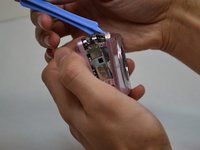
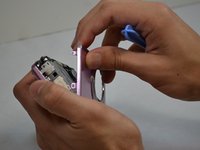
    2. Sony Cyber-Shot DSC-W120 Lens Assembly Replacement: step 2, image 1 of 2 Sony Cyber-Shot DSC-W120 Lens Assembly Replacement: step 2, image 2 of 2
      • Using a plastic opening tool, gently lift the side of the silver piece on the right side of the camera until it can be removed.

      Ask FixBot

      Add Comment

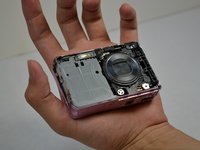
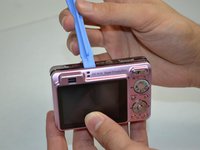
    3. Sony Cyber-Shot DSC-W120 Lens Assembly Replacement: step 3, image 1 of 3 Sony Cyber-Shot DSC-W120 Lens Assembly Replacement: step 3, image 2 of 3 Sony Cyber-Shot DSC-W120 Lens Assembly Replacement: step 3, image 3 of 3
      • Use a plastic opening tool to separate the front case of the camera, and gently remove it.

      Ask FixBot

      Add Comment

    4. Sony Cyber-Shot DSC-W120 Lens Assembly Replacement: step 4, image 1 of 1
      • Use a plastic opening tool to remove the silver piece on the left side of the camera.

      Ask FixBot

      Add Comment

    5. Sony Cyber-Shot DSC-W120 Lens Assembly Replacement: step 5, image 1 of 1
      • Remove the three screws from the bottom of the camera.

      Ask FixBot

      Add Comment

    6. Sony Cyber-Shot DSC-W120 Lens Assembly Replacement: step 6, image 1 of 2 Sony Cyber-Shot DSC-W120 Lens Assembly Replacement: step 6, image 2 of 2
      • Carefully remove the back case with a plastic opening tool.

      Ask FixBot

      Add Comment

    7. Sony Cyber-Shot DSC-W120 Lens Assembly Replacement: step 7, image 1 of 1
      • Unscrew the screw just above the mode dial.

      Ask FixBot

      Add Comment

    8. Sony Cyber-Shot DSC-W120 Lens Assembly Replacement: step 8, image 1 of 1
      Tool used on this step:
      Tweezers
      $4.99
      Buy
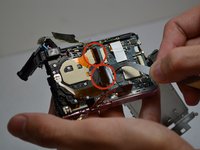
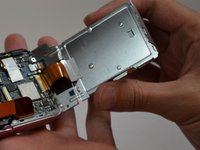
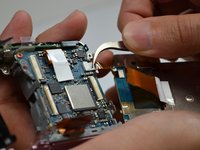
      • Lift the display from the rest of the camera and gently separate the connecting tape using tweezers.

      Ask FixBot

      Add Comment

    9. Sony Cyber-Shot DSC-W120 Lens Assembly Replacement: step 9, image 1 of 2 Sony Cyber-Shot DSC-W120 Lens Assembly Replacement: step 9, image 2 of 2
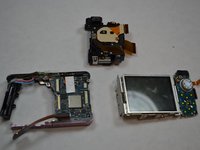
      • Separate the tape connecting the lens to the rest of the camera using tweezers.

      • Remove the lens.

      Ask FixBot

      Add Comment

    10. Sony Cyber-Shot DSC-W120 Lens Assembly Replacement: step 10, image 1 of 2 Sony Cyber-Shot DSC-W120 Lens Assembly Replacement: step 10, image 2 of 2
      • Insert wisdom here.

      Ask FixBot

      Add Comment

    11. Sony Cyber-Shot DSC-W120 Lens Assembly Replacement: step 11, image 1 of 1
      • Insert wisdom here.

      Ask FixBot

      Add Comment

Conclusion

To reassemble your device, follow these instructions in reverse order.

Cancel: I did not complete this guide.

3 other people completed this guide.

Dana Sanchez

Member since: 10/21/14

84 Reputation

3 Guides authored

Team

USF Tampa, Team 1-5, Leahy Fall 2014 Member of USF Tampa, Team 1-5, Leahy Fall 2014

USFT-LEAHY-F14S1G5

4 Members

10 Guides authored

0 Guide Comments

Add Comment

View Statistics:

Past 24 Hours: 0

Past 7 Days: 15

Past 30 Days: 69

All Time: 2,977