Free Shipping on Domestic Orders $75+

Sony Clie PEG-NR70 Memory Module Replacement

What you need

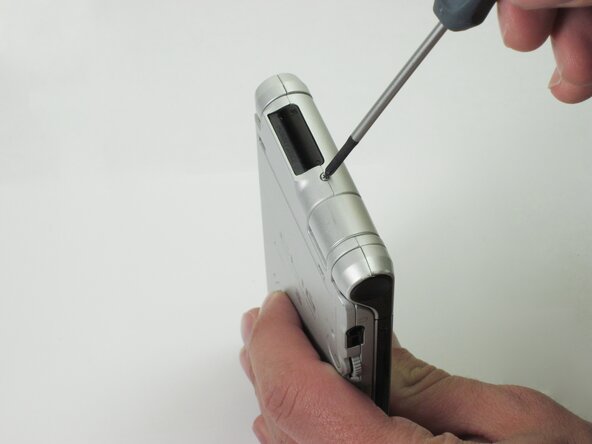
    1. Sony Clie PEG-NR70 Memory Module Replacement, The Case: step 1, image 1 of 1
      • Unscrew the 1.9mm screw located at the top of the device with a Phillips #00 screwdriver.

      • It may be helpful to set up a piece of paper to keep track of where removed screws came from.

      Ask FixBot

      Add Comment

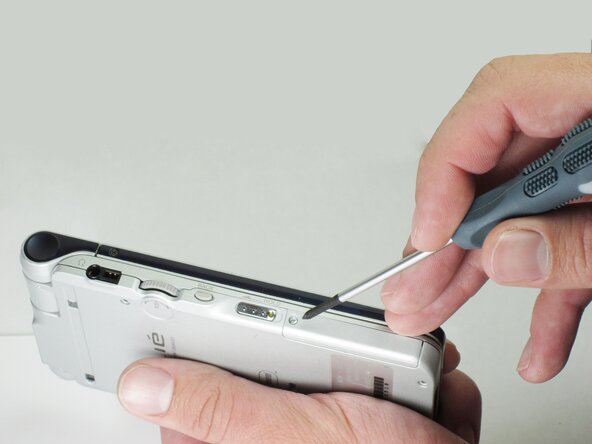
    2. Sony Clie PEG-NR70 Memory Module Replacement: step 2, image 1 of 1
      • Unscrew the 2.5mm screw located on the left side of the device with a Phillips #00 screwdriver.

      Ask FixBot

      Add Comment

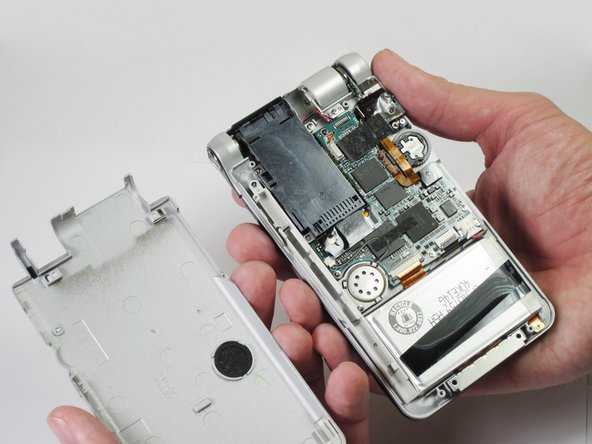
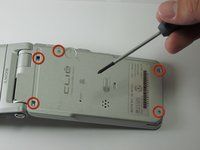
    3. Sony Clie PEG-NR70 Memory Module Replacement: step 3, image 1 of 2 Sony Clie PEG-NR70 Memory Module Replacement: step 3, image 2 of 2
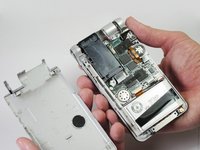
      • Unscrew the five 2.5mm screws on the back panel with a Phillips #00 screwdriver.

      • Remove the back panel by lifting it away with your hands.

      Ask FixBot

      Add Comment

    1. Sony Clie PEG-NR70 Memory Module Replacement, Memory Module: step 4, image 1 of 1
      • Holding the memory module in place, unscrew the three 0.9mm screws with a Phillips #00 screwdriver.

      Ask FixBot

      Add Comment

    2. Sony Clie PEG-NR70 Memory Module Replacement: step 5, image 1 of 1
      • Lightly grab the memory module and pull it upwards.

      • Make sure you grab the end closest to the edge of the device. You may have to wiggle the module a bit to get it to come free.

      Ask FixBot

      Add Comment

Conclusion

To reassemble your device, follow these instructions in reverse order.

Cancel: I did not complete this guide.

Daniel Soski

Member since: 04/18/13

63 Reputation

6 Guides authored

Team

Cal Poly, Team 14-11, Maness Spring 2013 Member of Cal Poly, Team 14-11, Maness Spring 2013

CPSU-MANESS-S13S14G11

5 Members

95 Guides authored

0 Guide Comments

Add Comment

View Statistics:

Past 24 Hours: 5

Past 7 Days: 6

Past 30 Days: 26

All Time: 918