
Sony CFD-8 Speaker Replacement

Liam Kirsh and 2 other contributors
Last updated on Jan 10, 2015
Views: 4.1K
View statistics:
- Past 24 Hours:
- 3
- Past 7 Days:
- 18
- Past 30 Days:
- 104
- All Time:
- 4,148
Comments: 0
No one has left comments on this guide. Will you be first?
Go to guide commentsCompleted: 2 3
2 people have marked this guide "completed." Will you be next?
3 people have marked this guide "completed." Including you — great job!
Favorites: 2 3
2 people have favorited (and subscribed to) this guide. Will you be next?
3 people have favorited (and subscribed to) this guide — including you!
Featured Student Guide
This guide has been the hard work of our awesome students and is found to be exceptionally cool by the iFixit staff.
Introduction
Go to step 1 ↓Use this guide to remove and replace the speakers in the Sony CFD-8 boombox.
What you need
Tools


-
-
-
Hold the boombox handle at an angle to access the screws behind the CD player.
-
Use a Phillips #1 screwdriver to unscrew the top two 14 mm screws. You may need a flashlight to see the screws.
 Ask FixBot
-
-
-
Remove four 14 mm screws using a Phillips #1 screwdriver. Two of these screws are at the bottom of the boombox and the other two are on either side of the boombox as highlighted in the related images.
-
All four screws have black arrows (not visible in the photo) indicating their location on the boombox.
-
-
-
-
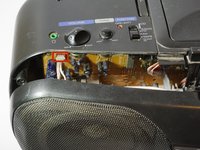
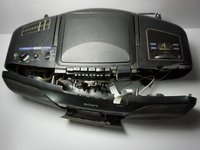
Gently separate the front panel from the back panel.
-
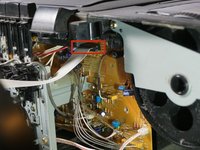
Remove the two connections holding the front panel to boombox.
-
One connection is located on the upper left hand side of the main circuit board.
-
The other is a large white strip slightly to the right of the cassette player.
-
Remove the front panel.
-
-
-
-
-
Use a 14cm Phillips #1 screwdriver to remove the four respective screws attaching the left and right speakers to the front panel.
-
-




To reassemble your device, follow these instructions in reverse order.
Cancel: I did not complete this guide.
2 other people completed this guide.

Team

Cal Poly, Team 10-38, Amido Fall 2014 Member of Cal Poly, Team 10-38, Amido Fall 2014
CPSU-AMIDO-F14S10G38
5 Members
84 Guides authored
