Free Shipping on Domestic Orders $75+

Sony Bloggie 3D Player USB Drive Replacement

What you need

  1. Sony Bloggie 3D Player USB Drive Replacement, Front Cover: step 1, image 1 of 1
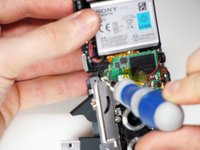
    • Remove the two 2.5mm Phillips #00 screws using the Philips #00 screwdriver.

    Ask FixBot

    Add Comment

  2. Sony Bloggie 3D Player USB Drive Replacement: step 2, image 1 of 2 Sony Bloggie 3D Player USB Drive Replacement: step 2, image 2 of 2
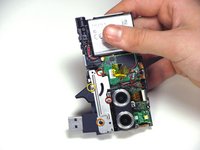
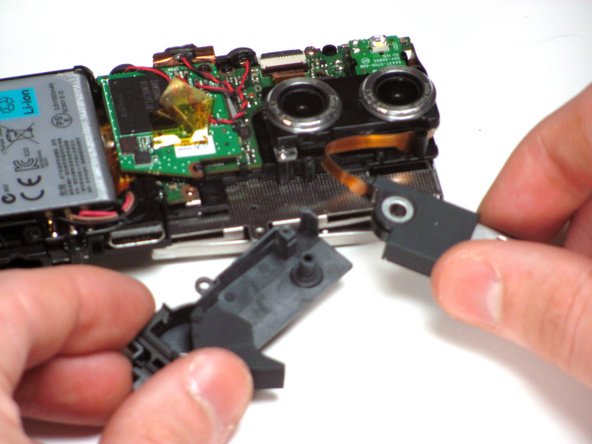
    • Use a plastic opening tool to pry the cover open.

    • After the the cover is partly open as shown, remove the cover with your hands.

    Ask FixBot

    Add Comment

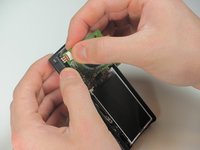
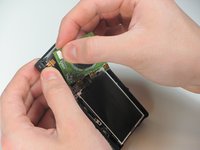
  3. Sony Bloggie 3D Player USB Drive Replacement, Back Cover: step 3, image 1 of 2 Sony Bloggie 3D Player USB Drive Replacement, Back Cover: step 3, image 2 of 2
    Tool used on this step:
    Tweezers
    $4.99
    Buy
    • Using your hand, or a pair of tweezers, remove the ZIF connector by gently pulling it out of the dock on the circuit board.

    Ask FixBot

    Add Comment

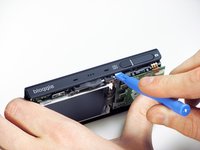
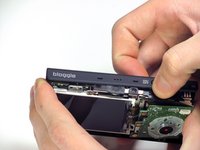
  4. Sony Bloggie 3D Player USB Drive Replacement: step 4, image 1 of 2 Sony Bloggie 3D Player USB Drive Replacement: step 4, image 2 of 2
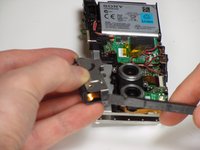
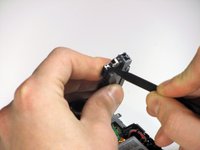
    • Use a plastic opening tool to loosen the back cover off the device.

    • Once the back cover is loose, remove it gently by hand.

    Ask FixBot

    Add Comment

  5. Sony Bloggie 3D Player USB Drive Replacement, USB Drive: step 5, image 1 of 2 Sony Bloggie 3D Player USB Drive Replacement, USB Drive: step 5, image 2 of 2
    • Once the back cover is removed, by using the opening tool, remove the following screws using a Phillips #00 screwdriver.

    • Two 4.0mm Phillips #00 screws

    • One 8.0mm Phillips #00 screw

    • One 9.5mm Phillips #00 screw

    Ask FixBot

    Add Comment

  6. Sony Bloggie 3D Player USB Drive Replacement: step 6, image 1 of 2 Sony Bloggie 3D Player USB Drive Replacement: step 6, image 2 of 2
    • Using a spudger, remove the clips of the metal casing from each end of the USB drive.

    Ask FixBot

    Add Comment

  7. Sony Bloggie 3D Player USB Drive Replacement: step 7, image 1 of 2 Sony Bloggie 3D Player USB Drive Replacement: step 7, image 2 of 2
    • Carefully lift the USB drive off of the peg that it is attached to.

    Ask FixBot

    Add Comment

  8. Sony Bloggie 3D Player USB Drive Replacement: step 8, image 1 of 1
    • Now that the USB component is on its own, untangle the ribbon from inside the device.

    Ask FixBot

    Add Comment

  9. Sony Bloggie 3D Player USB Drive Replacement: step 9, image 1 of 1
    Tool used on this step:
    Tweezers
    $4.99
    Buy
    • Now remove the ZIF connector from the device using a pair of tweezers.

    Ask FixBot

    Add Comment

Conclusion

To reassemble your device, follow these instructions in reverse order.

Cancel: I did not complete this guide.

Craig Sweet

Member since: 01/11/13

1 Reputation

1 Guide authored

Team

Cal Poly, Team 7-12, Maness Winter 2013 Member of Cal Poly, Team 7-12, Maness Winter 2013

CPSU-MANESS-W13S7G12

5 Members

15 Guides authored

0 Guide Comments

Add Comment

View Statistics:

Past 24 Hours: 0

Past 7 Days: 4

Past 30 Days: 26

All Time: 847