Free Shipping on Domestic Orders $75+

Sony BDP-s7200 Front Panel Cover Replacement

What you need

  1. Sony BDP-s7200 Front Panel Cover Replacement, Back Cover: step 1, image 1 of 1
    • Remove the disk tray cover from the device.

  2. Sony BDP-s7200 Front Panel Cover Replacement: step 2, image 1 of 2 Sony BDP-s7200 Front Panel Cover Replacement: step 2, image 2 of 2
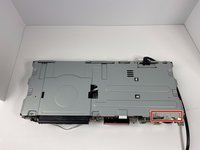
    • Using the Phillips #2 Screwdriver, remove the five 9mm from the bottom of the device.

    • Remove the metal cover.

  3. Sony BDP-s7200 Front Panel Cover Replacement: step 3, image 1 of 2 Sony BDP-s7200 Front Panel Cover Replacement: step 3, image 2 of 2
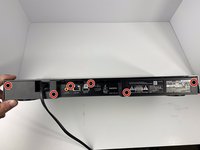
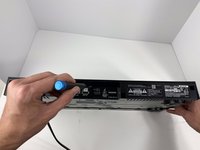
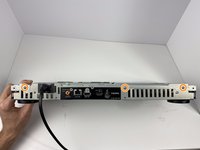
    • Using the Phillips #2 Screwdriver, remove the six 9mm screws from the back of the device.

  4. Sony BDP-s7200 Front Panel Cover Replacement: step 4, image 1 of 1
    • Pull off the back panel and remove it from the device.

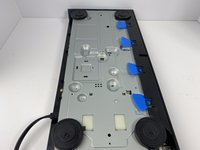
  5. Sony BDP-s7200 Front Panel Cover Replacement, Front Panel Cover: step 5, image 1 of 3 Sony BDP-s7200 Front Panel Cover Replacement, Front Panel Cover: step 5, image 2 of 3 Sony BDP-s7200 Front Panel Cover Replacement, Front Panel Cover: step 5, image 3 of 3
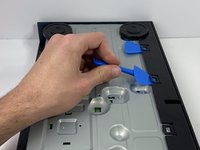
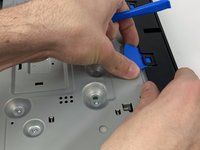
    • Using the plastic opening tool, open one of the tabs on the bottom of the device.

    • While keeping the tab open, insert a opening pick in between the opening tool and tab.

    • Repeat this for the 3 other tabs.

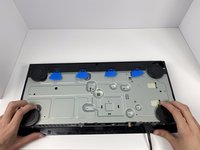
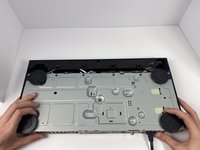
  6. Sony BDP-s7200 Front Panel Cover Replacement: step 6, image 1 of 2 Sony BDP-s7200 Front Panel Cover Replacement: step 6, image 2 of 2
    • Place your hands on the two black circles on the bottom of the device.

    • Pull on the black circles to remove the device from its front panel cover.

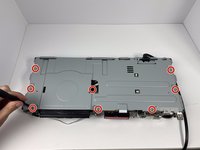
  7. Sony BDP-s7200 Front Panel Cover Replacement: step 7, image 1 of 3 Sony BDP-s7200 Front Panel Cover Replacement: step 7, image 2 of 3 Sony BDP-s7200 Front Panel Cover Replacement: step 7, image 3 of 3
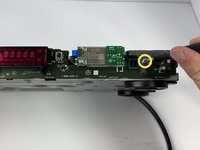
    • Using the Phillips #2 Screwdriver, remove the seven 9mm screws from the top of the device.

    • Using the same screwdriver, remove the three 9mm screws from the back of the device.

    • Using the same screwdriver, remove the one 9mm screw still connecting the small metal clip to the front of the device.

  8. Sony BDP-s7200 Front Panel Cover Replacement: step 8, image 1 of 2 Sony BDP-s7200 Front Panel Cover Replacement: step 8, image 2 of 2
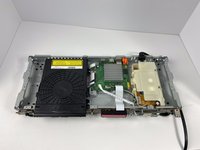
    • Remove the small metal clip on the front of the device.

    • Remove the metal cover on the top of the device.

Conclusion

To reassemble your device, follow these instructions in reverse order.

One other person completed this guide.

Mitchell Novak

Member since: 01/16/20

886 Reputation

5 Guides authored

0 Guide Comments

Add Comment

View Statistics:

Past 24 Hours: 0

Past 7 Days: 0

Past 30 Days: 12

All Time: 386