
Sony BDP-S3500 Wi-Fi Module Replacement

Bushra Banuso and 2 other contributors
Last updated on Jun 23, 2020
Views: 862
View statistics:
- Past 24 Hours:
- 1
- Past 7 Days:
- 10
- Past 30 Days:
- 66
- All Time:
- 862
Comments: 0
No one has left comments on this guide. Will you be first?
Go to guide commentsCompleted: 0 1
No one has marked this guide "completed." Will you be the first?
1 person has marked this guide "completed." It's you — great job!
Favorites: 0 1
No one has favorited (and subscribed to) this guide. Will you be the first?
1 person has favorited (and subscribed to) this guide — and that's you!
Inconsistent Images
Updating the images on this guide to be more consistent with the prerequisites would increase its awesomeness.
Introduction
Go to step 1 ↓The Wifi-Module allows the Sony BDP-S3500 Blu Ray player to connect wirelessly to the internet. This guide will show you how to replace it safely without damaging the other components.
Be sure to review the troubleshooting guide, as most of the time the problems are due malfunctioning software rather than it being a hardware issue.
What you need
Tools

-
-
-
Use the Phillips #2 screwdriver to remove the two 9mm screws located on the back of the device.
 Ask FixBot
-
-
-
Slide the top panel off towards the back of the device.
-
Remove the top panel.
-
-
-
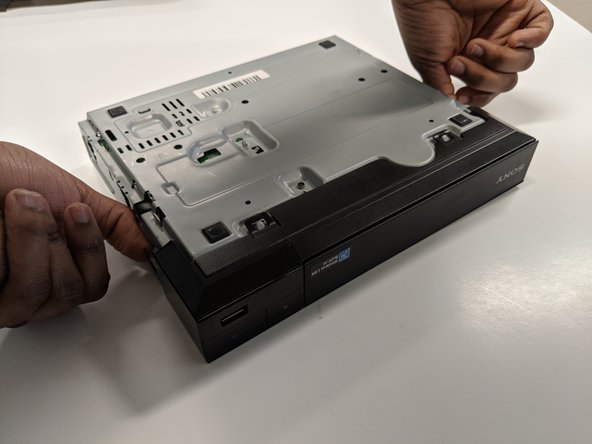
Unclip the plastic tags from the bottom of the device.
-
Unclip the plastic tags from the sides of the device.
-
Slide the front panel off.
-
-
-
-
-
Keep the back side up and facing towards you.
-
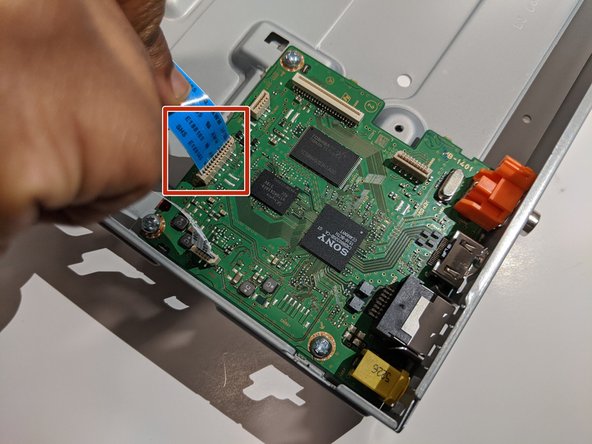
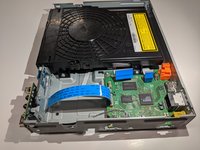
Carefully disconnect the blue ribbon connecting the port board and motherboard.
-
-
-
-
-
-
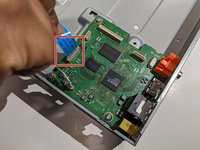
Remove the white ribbon cable connecting the Wi-Fi module to the motherboard by gently pulling it out.
-
-





To reassemble your device, follow these instructions in reverse order.

Team

York University, Team S8-G4, Turner Winter 2020 Member of York University, Team S8-G4, Turner Winter 2020
YORK-TURNER-W20S8G4
4 Members
60 Guides authored
