Introduction
This replacement guide will address how to remove a faulty motherboard from a Sony Alpha a7s II camera. The motherboard acts as the brain of the camera. It serves as the centralized hub to connecting all other processes inside the camera together.
The LCD screen and memory card are examples of other parts that rely on the motherboard. Provided in this replacement guide are the steps needed to properly remove the motherboard.
What you need
-
-
-
Remove the six 4mm screws located at the bottom of the camera using Philips #000 (Circled in red).
-
Remove the two 3mm screws remaining on the base plate using Philips #000 (Circled in orange).
-
Remove the base plate.
 Ask FixBot
-
-
-
Use the Philips #000 to remove the two 4mm screws located inside the battery holder.
-
Next, remove the two 4mm screws using the Philips #000 located on left side of the camera.
-
Remove one 4mm screw on the right side of the camera using Philips #000.
-
-
-
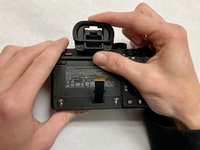
Remove the two 3mm screws from the underneath the LCD screen.
-
Remove the screen.
-
-
-
-
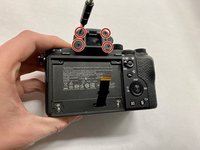
Remove the rubber viewfinder cap by sliding it upwards.
-
Remove the four 3mm screws behind the cap.
-
-
-
Remove the outer case.
-
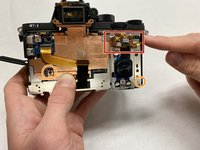
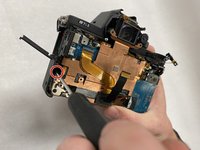
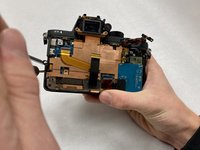
Unhook the component outlined by the red square.
-
Next, unscrew the two 4mm screws circled in orange using the Philips #000.
-
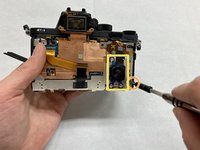
Remove the button outlined with the yellow square.
-
-
Tool used on this step:Tweezers$4.99
-
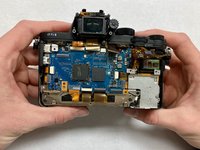
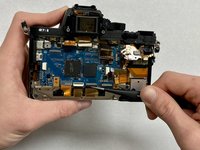
Gently pull the clip up on the wire ribbon ports.
-
Using the tweezers, gently pull the wire ribbons out of the ports.
-
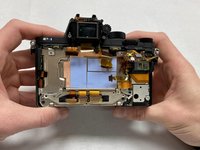
Once the ribbon cables are disconnected, the motherboard can be removed.
-
-








To reassemble your device, follow these instructions in reverse order.
Cancel: I did not complete this guide.
2 other people completed this guide.

Team

IUPUI, Team 1-5, Beck Spring 2022 Member of IUPUI, Team 1-5, Beck Spring 2022
IUPUI-BECK-S22S1G5
4 Members
12 Guides authored
2 Guide Comments
Where can I order the motherboard for this camera?
You can find replacement parts on Aliexpress.
