
Sony Alpha NEX-C3 Lens Mount Replacement

Jonathan Chen and 2 other contributors
Last updated on Dec 20, 2017
Views: 1.3K
View statistics:
- Past 24 Hours:
- 4
- Past 7 Days:
- 25
- Past 30 Days:
- 94
- All Time:
- 1,277
Comments: 0
No one has left comments on this guide. Will you be first?
Go to guide commentsCompleted: 0 1
No one has marked this guide "completed." Will you be the first?
1 person has marked this guide "completed." It's you — great job!
Favorites: 0 1
No one has favorited (and subscribed to) this guide. Will you be the first?
1 person has favorited (and subscribed to) this guide — and that's you!
Introduction
Go to step 1 ↓The lens mount can wear over time and improper installation of the lens could break the inner plastic ring of the lens mount.
What you need
Tools

-
-
-
-
Use a Phillips head 000 screwdriver to remove the four 5.0mm screws on the E-mount.
-
-
-
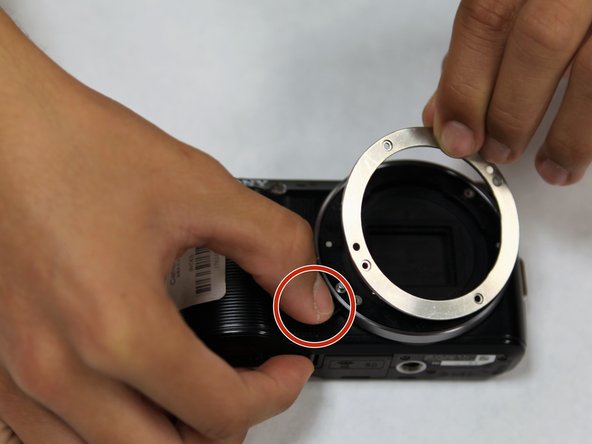
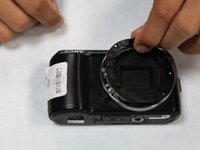
Press on the lens mount button with one hand.
-
With the other hand, grab and gently wiggle off the E-mount metal ring until its free.
-
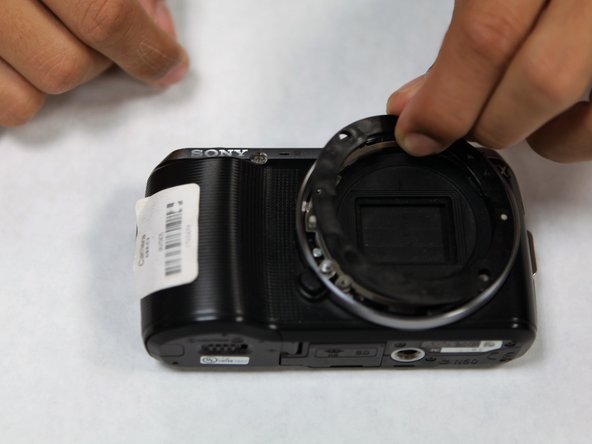
Remove the plastic ring located under the metal ring.
-

 Ask FixBot


To reassemble your device, follow these instructions in reverse order.

Team

UC Santa Barbara, Team S1-G1, Weedon Fall 2017 Member of UC Santa Barbara, Team S1-G1, Weedon Fall 2017
UCSB-WEEDON-F17S1G1
3 Members
72 Guides authored
