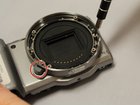
Sony Alpha NEX-5N Lens Release Button Replacement

Anna Tole and one other contributor
Last updated on Dec 18, 2015
Views: 2.8K
View statistics:
- Past 24 Hours:
- 5
- Past 7 Days:
- 33
- Past 30 Days:
- 106
- All Time:
- 2,815
Comments: 1
1 guide comment.
Go to guide commentsCompleted: 0 1
No one has marked this guide "completed." Will you be the first?
1 person has marked this guide "completed." It's you — great job!
Favorites: 0 1
No one has favorited (and subscribed to) this guide. Will you be the first?
1 person has favorited (and subscribed to) this guide — and that's you!
Introduction
Go to step 1 ↓The lens release button is a component of the camera body, and is used to release the lens from the camera body. This button can become stuck, stopping one from removing or switching lenses.
What you need
Tools

-
-
-
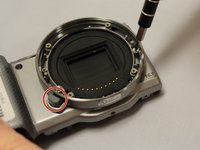
Unscrew the 4 silver 1.2 mm Phillips #000 screws along the front outer lens mount.
-
Detach the outer lens mount ring.
 Ask FixBot
-
-
-
Using your fingers, pull out the first black spacer ring.
-
Repeat the previous step for the second silver spacer ring.
-
-
-
-
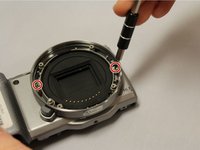
Unscrew the 2 silver 1.2 mm Phillips #000 screws on opposing sides in the lens ring area.
-
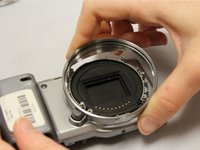
Using your fingers, easily pull off lens housing. This will complete the removal of the E-mount.
-
-
-
-
-
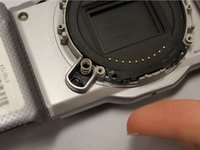
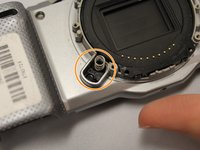
Find the lens release button.
-
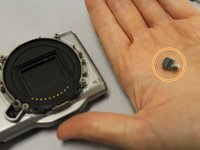
The button should be easily removed by hand.
-
-
-
After removing the button, the spring underneath it is uncovered and can be replaced.
-
This completes the removal of the lens release button.
-
-





To reassemble your device, follow these instructions in reverse order.

Team

Eastern Washington University, Team 1-4, Matresse Fall 2015 Member of Eastern Washington University, Team 1-4, Matresse Fall 2015
EWU-MATRESSE-F15S1G4
4 Members
72 Guides authored
