Introduction
This guide will show you how to unlock the latch that holds the battery compartment, and how to eject the battery from the Sony Alpha NEX-5N.
-
-
-
Turn the device off by switching the power knob to face the word "OFF".
 Ask FixBot
-
-
-
-
Flip the device upside-down and gently place it down on a flat surface.
-
Locate the battery compartment, which is indicated by a grooved latch.
-
Push the latch to the right so that the arrow is positioned above the word "Open". The door should then flip upward.
-
-
-
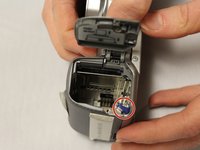
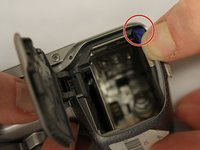
With the battery compartment latch open, locate the lock lever.
-
Press the lock lever to the left. This will eject the camera battery.
-
-


To reassemble your device, follow these instructions in reverse order.

Team

Eastern Washington University, Team 1-4, Matresse Fall 2015 Member of Eastern Washington University, Team 1-4, Matresse Fall 2015
EWU-MATRESSE-F15S1G4
4 Members
72 Guides authored
