Free Shipping on Domestic Orders $75+

Sony Alpha A3000 shutter button Replacement

What you need

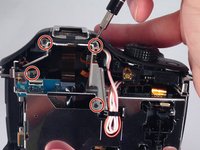
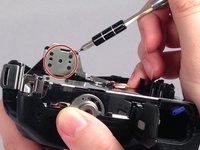
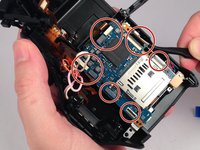
  1. Sony Alpha A3000 shutter button Replacement, Rear Case: step 1, image 1 of 3 Sony Alpha A3000 shutter button Replacement, Rear Case: step 1, image 2 of 3 Sony Alpha A3000 shutter button Replacement, Rear Case: step 1, image 3 of 3
    • Remove the seven highlighted screws shown here.

    • Screws are teeny tiny, don't lose them!

    Ask FixBot

    Add Comment

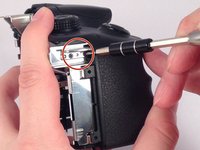
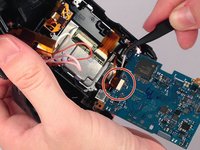
  2. Sony Alpha A3000 shutter button Replacement: step 2, image 1 of 2 Sony Alpha A3000 shutter button Replacement: step 2, image 2 of 2
    • Remove this final screw from the memory card compartment.

    • Remove the chassis by pulling the back cover away from the camera.

    • Be careful not to damage any of the delicate ribbon cables when removing the chassis.

    Ask FixBot

    Add Comment

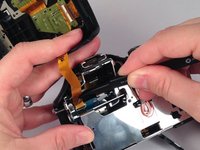
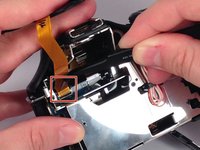
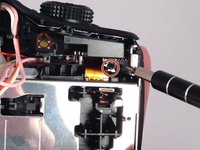
  3. Sony Alpha A3000 shutter button Replacement: step 3, image 1 of 2 Sony Alpha A3000 shutter button Replacement: step 3, image 2 of 2
    • Gently but forcefully lift up on the parallel cable connecting the two halves of the camera.

    Ask FixBot

    Add Comment

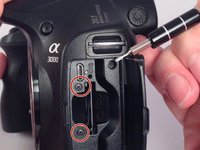
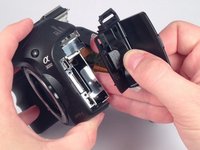
  4. Sony Alpha A3000 shutter button Replacement, Motherboard: step 4, image 1 of 2 Sony Alpha A3000 shutter button Replacement, Motherboard: step 4, image 2 of 2
    • After removing the backing from the camera. Remove the two final screws in the memory compartment area.

    • Detach the facing for the memory dock.

    Ask FixBot

    Add Comment

  5. Sony Alpha A3000 shutter button Replacement: step 5, image 1 of 2 Sony Alpha A3000 shutter button Replacement: step 5, image 2 of 2
    • Remove the eight screws securing the mount for the flash device.

    Ask FixBot

    Add Comment

  6. Sony Alpha A3000 shutter button Replacement: step 6, image 1 of 2 Sony Alpha A3000 shutter button Replacement: step 6, image 2 of 2
    • Remove the three remaining screws holding in the protective metal casing.

    Ask FixBot

    Add Comment

  7. Sony Alpha A3000 shutter button Replacement: step 7, image 1 of 1
    • Remove the metal casing.

    Ask FixBot

    Add Comment

  8. Sony Alpha A3000 shutter button Replacement: step 8, image 1 of 1
    • Remove three screws holding down the motherboard .

    Ask FixBot

    Add Comment

  9. Sony Alpha A3000 shutter button Replacement: step 9, image 1 of 2 Sony Alpha A3000 shutter button Replacement: step 9, image 2 of 2
    • Detach the nine serial cables connecting it to the camera body.

    Ask FixBot

    Add Comment

  10. Sony Alpha A3000 shutter button Replacement: step 10, image 1 of 1
    • Finally remove the motherboard from the casing.

    Ask FixBot

    Add Comment

  11. Sony Alpha A3000 shutter button Replacement, ...: step 11, image 1 of 1
    • shutter button placement...

    Ask FixBot

    Add Comment

  12. Sony Alpha A3000 shutter button Replacement, Unscrew motherboard frame: step 12, image 1 of 2 Sony Alpha A3000 shutter button Replacement, Unscrew motherboard frame: step 12, image 2 of 2
    • Remove two screws holding plastic/metal frame.

    Ask FixBot

    Add Comment

  13. Sony Alpha A3000 shutter button Replacement, Remove motherboard frame: step 13, image 1 of 2 Sony Alpha A3000 shutter button Replacement, Remove motherboard frame: step 13, image 2 of 2
    • Holding the battery door gently lift the frame up .

    Ask FixBot

    Add Comment

  14. Sony Alpha A3000 shutter button Replacement, Capacitor module: step 14, image 1 of 2 Sony Alpha A3000 shutter button Replacement, Capacitor module: step 14, image 2 of 2
    • Pull out the capacitor and move the capacitor board (flexible) to the left to clear the way for future steps.

    Ask FixBot

    Add Comment

  15. Sony Alpha A3000 shutter button Replacement, Remove buttons module: step 15, image 1 of 3 Sony Alpha A3000 shutter button Replacement, Remove buttons module: step 15, image 2 of 3 Sony Alpha A3000 shutter button Replacement, Remove buttons module: step 15, image 3 of 3
    • Remove two screws mounting plastic buttons module.

    • Remove the module.

    Ask FixBot

    Add Comment

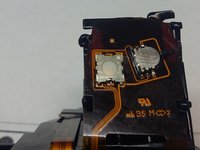
  16. Sony Alpha A3000 shutter button Replacement, Soldering!: step 16, image 1 of 3 Sony Alpha A3000 shutter button Replacement, Soldering!: step 16, image 2 of 3 Sony Alpha A3000 shutter button Replacement, Soldering!: step 16, image 3 of 3
    • Replace the ALPS SKSDPCE010 microswitch. Look out for the correct allignment and orientation (first pin marked with a dot).

    Ask FixBot

    Add Comment

Conclusion

To reassemble your device, follow these instructions in reverse order.

Cancel: I did not complete this guide.

One other person completed this guide.

Andrzej Majchrzak

Member since: 04/26/17

131 Reputation

1 Guide authored

3 Guide Comments

Excellent article, I would like to know what should be done to replace or repair the mode selector of the camera, (Dial mode) I appreciate this great contribution. Greetings.

Edgar Delgado - Reply Share

Mode selector switch is visible on 2 photos of buttons module PCB. Look for a switch with blue knob on 2nd Photo of step 16. I dont know the serial number or replacement.

Andrzej Majchrzak - Reply Share

Thank you so much for reply.

Edgar Delgado - Reply Share

Add Comment

View Statistics:

Past 24 Hours: 1

Past 7 Days: 13

Past 30 Days: 80

All Time: 3,818