Free Shipping on Domestic Orders $75+

Sony Alpha A3000 Motherboard Replacement

Views: 3.4K

View statistics:

Past 24 Hours:
2
Past 7 Days:
25
Past 30 Days:
102
All Time:
3,445
Comments: 1

1 guide comment.

Go to guide comments
Completed: 8

8 people have marked this guide "completed." Will you be next?

Favorites: 0

No one has favorited (and subscribed to) this guide. Will you be the first?

Time Required: 10 minutes
Difficulty: Moderate
Sony Alpha A3000 Motherboard Replacement

Introduction

Go to step 1 ↓

This guide provided instruction on removing the motherboard and should only be followed if a compatible replacement is available or subsequent repair procedures require its removal.

What you need

Tools

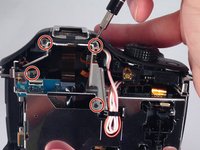
    1. Sony Alpha A3000 Motherboard Replacement, Rear Case: step 1, image 1 of 3 Sony Alpha A3000 Motherboard Replacement, Rear Case: step 1, image 2 of 3 Sony Alpha A3000 Motherboard Replacement, Rear Case: step 1, image 3 of 3
      • Remove the seven highlighted screws shown here.

      • Screws are teeny tiny, don't lose them!

      Ask FixBot

      Add Comment

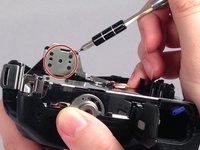
    2. Sony Alpha A3000 Motherboard Replacement: step 2, image 1 of 2 Sony Alpha A3000 Motherboard Replacement: step 2, image 2 of 2
      • Remove this final screw from the memory card compartment.

      • Remove the chassis by pulling the back cover away from the camera.

      • Be careful not to damage any of the delicate ribbon cables when removing the chassis.

      Ask FixBot

      Add Comment

    3. Sony Alpha A3000 Motherboard Replacement: step 3, image 1 of 2 Sony Alpha A3000 Motherboard Replacement: step 3, image 2 of 2
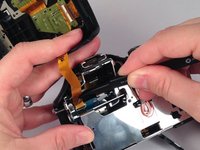
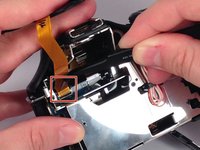
      • Gently but forcefully lift up on the parallel cable connecting the two halves of the camera.

      Ask FixBot

      Add Comment

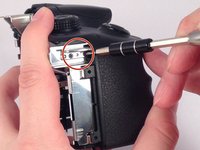
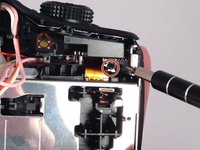
    1. Sony Alpha A3000 Motherboard Replacement, Motherboard: step 4, image 1 of 2 Sony Alpha A3000 Motherboard Replacement, Motherboard: step 4, image 2 of 2
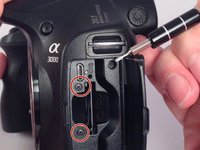
      • After removing the backing from the camera. Remove the two final screws in the memory compartment area.

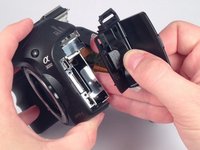
      • Detach the facing for the memory dock.

      Ask FixBot

      Add Comment

    2. Sony Alpha A3000 Motherboard Replacement: step 5, image 1 of 2 Sony Alpha A3000 Motherboard Replacement: step 5, image 2 of 2
      • Remove the eight screws securing the mount for the flash device.

      Ask FixBot

      Add Comment

    3. Sony Alpha A3000 Motherboard Replacement: step 6, image 1 of 2 Sony Alpha A3000 Motherboard Replacement: step 6, image 2 of 2
      • Remove the three remaining screws holding in the protective metal casing.

      Ask FixBot

      Add Comment

    4. Sony Alpha A3000 Motherboard Replacement: step 7, image 1 of 1
      • Remove the metal casing.

      Ask FixBot

      Add Comment

    5. Sony Alpha A3000 Motherboard Replacement: step 8, image 1 of 1
      • Remove three screws holding down the motherboard .

      Ask FixBot

      Add Comment

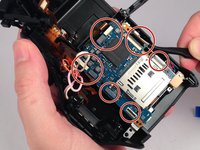
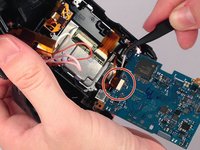
    6. Sony Alpha A3000 Motherboard Replacement: step 9, image 1 of 2 Sony Alpha A3000 Motherboard Replacement: step 9, image 2 of 2
      • Detach the nine serial cables connecting it to the camera body.

      Ask FixBot

      Add Comment

    7. Sony Alpha A3000 Motherboard Replacement: step 10, image 1 of 1
      • Finally remove the motherboard from the casing.

      Ask FixBot

      Add Comment

Conclusion

To reassemble your device, follow these instructions in reverse order.

Cancel: I did not complete this guide.

8 other people completed this guide.

Leonard Holloman

Member since: 08/31/15

662 Reputation

4 Guides authored

Team

USF Tampa, Team 4-4, Meier Fall 2015 Member of USF Tampa, Team 4-4, Meier Fall 2015

USFT-MEIER-F15S4G4

4 Members

60 Guides authored

1 Guide Comment

Then loose the plug all the motherboard?

kongre172 - Reply Share

Add Comment

View Statistics:

Past 24 Hours: 2

Past 7 Days: 25

Past 30 Days: 102

All Time: 3,445