
Sony Alpha 5100 Front Plate Replacement

Kevin Raggiani and 3 other contributors
Last updated on Jan 15, 2026
Views: 2.4K
View statistics:
- Past 24 Hours:
- 4
- Past 7 Days:
- 24
- Past 30 Days:
- 78
- All Time:
- 2,438
Comments: 3
1 comment on steps, 2 guide comments.
Go to guide commentsCompleted: 0 1
No one has marked this guide "completed." Will you be the first?
1 person has marked this guide "completed." It's you — great job!
Favorites: 0 1
No one has favorited (and subscribed to) this guide. Will you be the first?
1 person has favorited (and subscribed to) this guide — and that's you!
Better Introduction
Improve this guide by completing or revising its introduction.
Introduction
Go to step 1 ↓Use this guide to replace the front plate on the Sony Alpha 5100 (or Sony a5100).
Always use CAUTION when self-repairing and follow the instructions closely to avoid potential damage to the device.
-
-
-
Slide the power switch on the top of the camera to "off."
-
Turn the camera over to the bottom, and push the latch towards the side marked "open" to release the battery cover.
 Ask FixBot
-
-
-
Push the blue spring-loaded lever to release the battery.
-
Remove the battery from the camera.
-
-
-
-
-
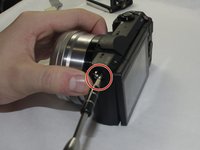
Remove one 2mm Phillips #00 screw from the flash plate cover.
-
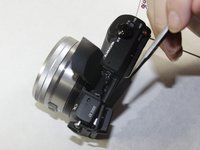
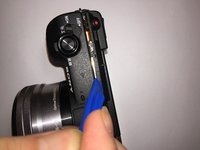
Use the spudger to pop the plate off.
-
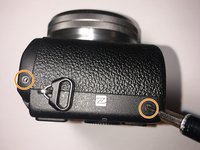
Remove two 2mm Phillips #00 screws on the side of the camera.
-
-
-
Pop the memory card door open by gently lifting the door up.
-
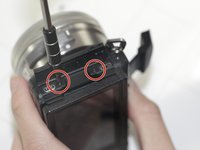
Remove two 2mm Phillips #00 screws from the side of the camera.
-
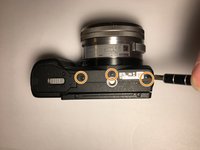
Remove three 2mm Phillips #00 screws on the bottom of the camera.
-
-
-






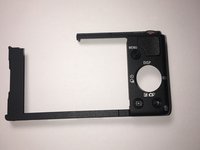
To reassemble your device, follow these instructions in reverse order.

Team

UMass Dartmouth, Team S4-G6, Saloman Fall 2019 Member of UMass Dartmouth, Team S4-G6, Saloman Fall 2019
UMASSD-SALOMAN-F19S4G6
3 Members
48 Guides authored
