
Sony α6000 Battery Replacement

Andrea Lopez and 2 other contributors
Last updated on Apr 8, 2024
Views: 2.5K
View statistics:
- Past 24 Hours:
- 2
- Past 7 Days:
- 23
- Past 30 Days:
- 91
- All Time:
- 2,458
Comments: 1
1 comment on steps.
Completed: 2 3
2 people have marked this guide "completed." Will you be next?
3 people have marked this guide "completed." Including you — great job!
Favorites: 0 1
No one has favorited (and subscribed to) this guide. Will you be the first?
1 person has favorited (and subscribed to) this guide — and that's you!
Introduction
Go to step 1 ↓If your camera won't turn on, this guide could help you. This guide helps to replace the battery in your camera. No special tools are needed.


 Ask FixBot


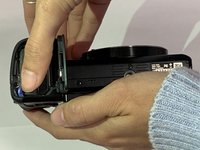
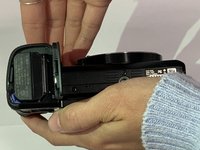


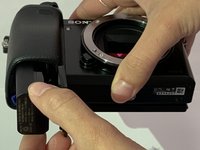
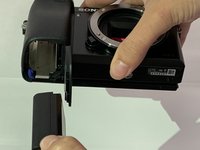
To put the battery back in, follow these instructions in reverse order.
Cancel: I did not complete this guide.
2 other people completed this guide.

Team

University of South Florida St. Petersburg, Team S1-G4, Stowe Fall 2018 Member of University of South Florida St. Petersburg, Team S1-G4, Stowe Fall 2018
USFSP-STOWE-F18S1G4
4 Members
24 Guides authored
