Free Shipping on Domestic Orders $75+

Sonos Roam 2 Motherboard Replacement

What you need

  1. Sonos Roam 2 Motherboard Replacement, Outer Shell: step 1, image 1 of 3 Sonos Roam 2 Motherboard Replacement, Outer Shell: step 1, image 2 of 3 Sonos Roam 2 Motherboard Replacement, Outer Shell: step 1, image 3 of 3
    • Stand the speaker on either end so that it's vertical.

    • Wedge your opening pick between the speaker and the rubber triangle on the end of the speaker.

    • There is a layer of adhesive you'll have to get through in order to take off the rubber end.

    • Wiggle the pick back and forth and drag the pick around the edges to break through this adhesive.

    • This may take a decent amount of time and effort as the adhesive can be a little stubborn.

    • Completely remove the rubber triangle.

  2. Sonos Roam 2 Motherboard Replacement: step 2, image 1 of 2 Sonos Roam 2 Motherboard Replacement: step 2, image 2 of 2
    • Flip the speaker over and begin working on the rubber triangle on the other side.

    • Wedge your opening pick between the speaker and the rubber triangle. Wiggle the pick back and forth and drag the pick around the edges to break through the adhesive.

    • It may take a decent amount of time and effort to break through the adhesive.

    • Completely remove the rubber triangle.

  3. Sonos Roam 2 Motherboard Replacement: step 3, image 1 of 2 Sonos Roam 2 Motherboard Replacement: step 3, image 2 of 2
    • Remove the two 7.5 mm screws using a T6 Torx screwdriver.

    • Flip the speaker over and remove the other two 7.5 mm screws using a T6 Torx screwdriver.

  4. Sonos Roam 2 Motherboard Replacement: step 4, image 1 of 3 Sonos Roam 2 Motherboard Replacement: step 4, image 2 of 3 Sonos Roam 2 Motherboard Replacement: step 4, image 3 of 3
    • Insert your opening pick between the outer shell and the main body.

    • Work your way along the seam from top to bottom, gently prying at intervals to break the adhesive bond.

    • When the outer shell is adequately loosened, lift and remove the outer shell from the speaker assembly.

  5. Sonos Roam 2 Motherboard Replacement, Speaker Driver: step 5, image 1 of 3 Sonos Roam 2 Motherboard Replacement, Speaker Driver: step 5, image 2 of 3 Sonos Roam 2 Motherboard Replacement, Speaker Driver: step 5, image 3 of 3
    • Remove the six 7.5 mm screws securing the speaker driver using a T10 Torx screwdriver.

  6. Sonos Roam 2 Motherboard Replacement: step 6, image 1 of 2 Sonos Roam 2 Motherboard Replacement: step 6, image 2 of 2
    • Use the opening pick along the edge to gently lift and release the speaker driver.

    • Avoid excessive force when pulling, as this may damage the speaker.

  7. Sonos Roam 2 Motherboard Replacement: step 7, image 1 of 2 Sonos Roam 2 Motherboard Replacement: step 7, image 2 of 2
    • Press the connector release tab and gently pull the speaker driver free, taking care not to strain the attached wires.

  8. Sonos Roam 2 Motherboard Replacement, Motherboard: step 8, image 1 of 2 Sonos Roam 2 Motherboard Replacement, Motherboard: step 8, image 2 of 2
    • Remove the four 7.5 mm screws using a T10 Torx screwdriver.

    • One of the screws is hiding under the foam that's protecting a wire.

  9. Sonos Roam 2 Motherboard Replacement: step 9, image 1 of 3 Sonos Roam 2 Motherboard Replacement: step 9, image 2 of 3 Sonos Roam 2 Motherboard Replacement: step 9, image 3 of 3
    • Use an opening pick to flip up the retaining flaps on each of the two connectors.

    • It doesn't take too much pressure to lift the flaps. You will not need to push very hard.

  10. Sonos Roam 2 Motherboard Replacement: step 10, image 1 of 3 Sonos Roam 2 Motherboard Replacement: step 10, image 2 of 3 Sonos Roam 2 Motherboard Replacement: step 10, image 3 of 3
    • Use your opening pick and tweezers to pry out the black connector.

    • It may take a decent amount of pressure to pop these connectors out, but try to be careful and gentle.

    • Flip the speaker to better access the smaller black connector.

    • Use the opening pick to pry out the smaller black connector.

  11. Sonos Roam 2 Motherboard Replacement: step 11, image 1 of 3 Sonos Roam 2 Motherboard Replacement: step 11, image 2 of 3 Sonos Roam 2 Motherboard Replacement: step 11, image 3 of 3
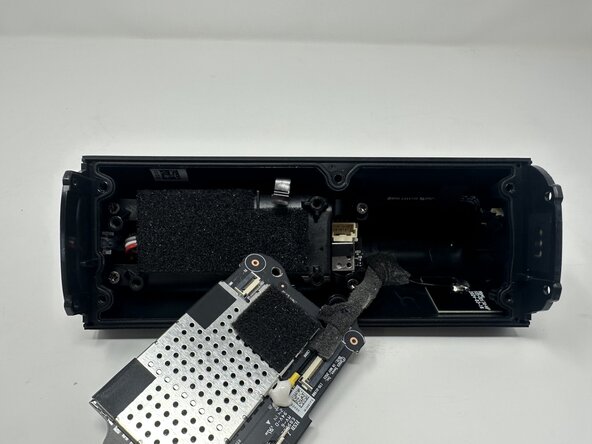
    • Pull the motherboard off of the battery case.

    • The motherboard wire encased in foam is partly attached to the speaker via a weak adhesive.

    • Gently pull the wire to break the adhesive.

  12. Sonos Roam 2 Motherboard Replacement: step 12, image 1 of 3 Sonos Roam 2 Motherboard Replacement: step 12, image 2 of 3 Sonos Roam 2 Motherboard Replacement: step 12, image 3 of 3
    • The wire is welded onto the speaker. Use the soldering iron to melt the metal keeping it on the speaker.

    • Completely remove the wire from the speaker. Remove the motherboard.

Conclusion

To reassemble your device, follow these instructions in reverse order.

2 other people completed this guide.

Joseph Stewart

Member since: 09/09/25

613 Reputation

3 Guides authored

Team

0 Guide Comments

Add Comment

View Statistics:

Past 24 Hours: 1

Past 7 Days: 2

Past 30 Days: 15

All Time: 132