Free Shipping on Domestic Orders $75+

Sonos Play 5 Motherboard Replacement

What you need

  1. Sonos Play 5 Motherboard Replacement, Front Panel Assembly: step 1, image 1 of 1
    • Disconnect any power to the speaker and wait a few minutes for the capacitors to fully discharge.

    • Flip the speaker upside down.

    • There may be a rubber foot covering the bottom screws (not included in picture). Remove this by pulling up from one of the corners using a spudger.

  2. Sonos Play 5 Motherboard Replacement: step 2, image 1 of 2 Sonos Play 5 Motherboard Replacement: step 2, image 2 of 2
    • Remove eight 10mm Phillips #2 screws

    • Remove the bottom panel by pulling upwards.

    • Be very gentle with the ends of the three antennas. They are very fragile.

  3. Sonos Play 5 Motherboard Replacement: step 3, image 1 of 3 Sonos Play 5 Motherboard Replacement: step 3, image 2 of 3 Sonos Play 5 Motherboard Replacement: step 3, image 3 of 3
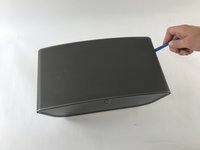
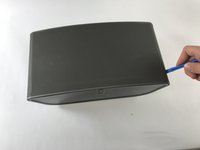
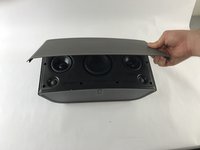
    • Flip the device so that the grille is facing up.

    • Locate the line on the right side of the speaker where the grill and the plastic meet, and place your plastic opening tool in the gap.

    • Run the spudger along the gap, loosening the grille from the plastic. Repeat this process on the left side as well.

    • Gently pull up on the grille, removing it from the front panel.

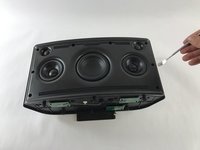
  4. Sonos Play 5 Motherboard Replacement: step 4, image 1 of 1
    • Remove the six 8mm Phillips #2 screws.

    • Remove the two 10mm Phillips #2 screws.

  5. Sonos Play 5 Motherboard Replacement: step 5, image 1 of 2 Sonos Play 5 Motherboard Replacement: step 5, image 2 of 2
    • Locate the line on the right side where the front panel and back panel meet. Place a plastic opening tool in the gap, and run it along the gap. Repeat this on the left side.

    • Use the opening tool to lift the front plate. If a plastic tool is not providing enough leverage, use a metal opening tool.

    • Gently pull up on the face plate to ensure it has been detached from the enclosure.

    • When pulling on the face plate be cautious because it is still connected by wires on the back of the plate.

  6. Sonos Play 5 Motherboard Replacement: step 6, image 1 of 3 Sonos Play 5 Motherboard Replacement: step 6, image 2 of 3 Sonos Play 5 Motherboard Replacement: step 6, image 3 of 3
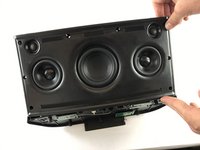
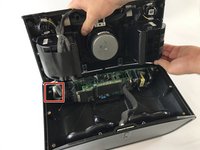
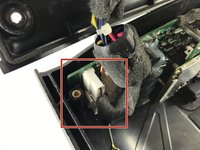
    • Lift up the front panel, forming a 90 degree angle with the back panel. Locate the locate ten pin connector shown. This is the wire that connects the front panel to back panel.

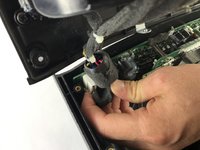
    • Press down on the small tab located on the connector. With the tab firmly pressed down, pull the connector out from its socket.

    • The faceplate assembly is now fully detached from the rest of the speaker.

  7. Sonos Play 5 Motherboard Replacement, Motherboard: step 7, image 1 of 3 Sonos Play 5 Motherboard Replacement, Motherboard: step 7, image 2 of 3 Sonos Play 5 Motherboard Replacement, Motherboard: step 7, image 3 of 3
    • Remove the ten pin connector.

  8. Sonos Play 5 Motherboard Replacement: step 8, image 1 of 1
    • Flip the device over on its front side.

  9. Sonos Play 5 Motherboard Replacement: step 9, image 1 of 1
    • Remove six 5mm Phillips #0 screws.

    • Remove two 7mm Phillips #2 screws.

  10. Sonos Play 5 Motherboard Replacement: step 10, image 1 of 1
    • Flip the device on its back.

  11. Sonos Play 5 Motherboard Replacement: step 11, image 1 of 3 Sonos Play 5 Motherboard Replacement: step 11, image 2 of 3 Sonos Play 5 Motherboard Replacement: step 11, image 3 of 3
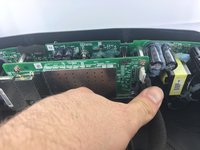
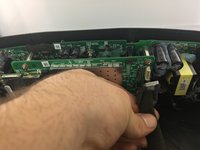
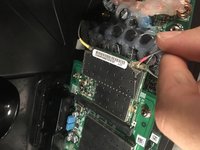
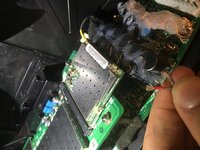
    • Remove the grey and red antenna connectors by lifting them away from the board.

    • Pull cords away from the board.

  12. Sonos Play 5 Motherboard Replacement: step 12, image 1 of 2 Sonos Play 5 Motherboard Replacement: step 12, image 2 of 2
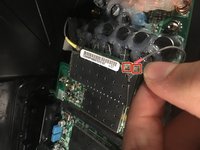
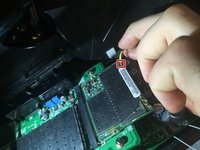
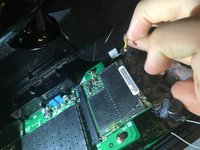
    • Remove the yellow antenna connector by lifting it away from the board.

    • Pull cord away from the board.

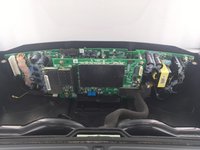
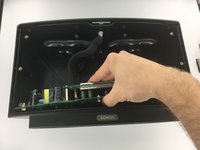
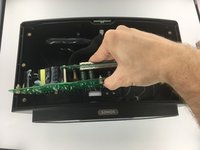
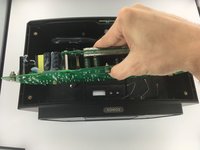
  13. Sonos Play 5 Motherboard Replacement: step 13, image 1 of 3 Sonos Play 5 Motherboard Replacement: step 13, image 2 of 3 Sonos Play 5 Motherboard Replacement: step 13, image 3 of 3
    • Remove circuit board by lifting it straight away from the rear plate.

Conclusion

To reassemble your device, follow these instructions in reverse order.

10 other people completed this guide.

Khari Barley

Member since: 02/20/17

221 Reputation

1 Guide authored

Team

USF Tampa, Team S3-G6, Sullivan Spring 2017 Member of USF Tampa, Team S3-G6, Sullivan Spring 2017

USFT-SULLIVAN-S17S3G6

4 Members

21 Guides authored

3 Guide Comments

So far so good, where to get a new power board?

Sonos P/N: 170-00236

B. Buil - Reply Share

Where do you get the parts?

bodtker - Reply Share

Possible to buy components anywhere?

thomaspmunster - Reply Share

Add Comment

View Statistics:

Past 24 Hours: 3

Past 7 Days: 35

Past 30 Days: 124

All Time: 10,770