
Solio CLASSIC2 Removing the Circuit Board

Eric Padilla and 4 other contributors
Last updated on May 7, 2024
Views: 723
View statistics:
- Past 24 Hours:
- 2
- Past 7 Days:
- 21
- Past 30 Days:
- 93
- All Time:
- 723
Comments: 0
No one has left comments on this guide. Will you be first?
Go to guide commentsCompleted: 0 1
No one has marked this guide "completed." Will you be the first?
1 person has marked this guide "completed." It's you — great job!
Favorites: 0 1
No one has favorited (and subscribed to) this guide. Will you be the first?
1 person has favorited (and subscribed to) this guide — and that's you!
Introduction
Go to step 1 ↓Removing the circuit board will allow you to more easily solder on the circuit board.
What you need
Tools


-
-
-
Turn off the device by pressing on the clear power button behind the device.
 Ask FixBot
-
-
-
Using the Phillips #1 screwdriver, remove the 2mm screw located on the bottom of the device, near the hinge.
-
-
-
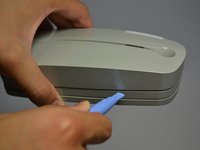
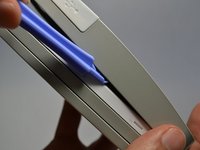
Using the plastic opening tools, gently pry open the side of the large panel.
-
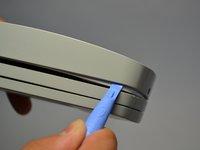
Keeping the tool in, slowly slide the tool along the side of the panel.
-
-
-
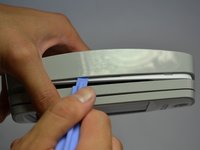
Rotate the device 180 degrees.
-
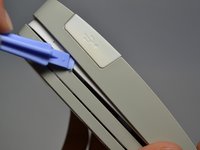
Gently slide the plastic opening tool along the side of the panel.
-
-
-
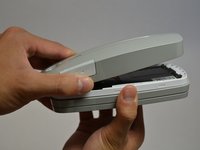
Using both hands, slowly pull apart the back panel from the rest of the device.
-
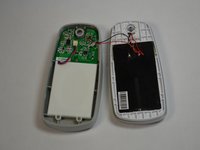
Gently flip the back panel open so the circuit board faces up and the two panels are side by side.
-
-
-
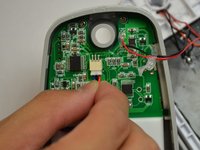
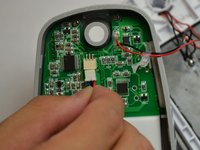
Softly pinch the red and blue wires close to the white connector.
-
To pull the wires out, wiggle them back and forth until the connector is fully out.
-
-
-
-
-
-
Unscrew the three 2mm screws holding the circuit board down using a Phillips #1 screwdriver.
-
-
Tool used on this step:Tweezers$4.99
-
Make sure the white USB port cover on the side of the device is pulled out or you won't be able to lift the circuit board.
-
Gently lift the circuit board out of the device using tweezers.
-
-










To reassemble your device, follow these instructions in reverse order.

Team

Cal Poly, Team 4-28, Amido Fall 2013 Member of Cal Poly, Team 4-28, Amido Fall 2013
CPSU-AMIDO-F13S4G28
4 Members
84 Guides authored
