Free Shipping on Domestic Orders $75+

Skullcandy Air Raid Battery Replacement

What you need

  1. Skullcandy Air Raid Battery Replacement, Rubber Cover: step 1, image 1 of 1
    • Starting with the corners, gently pull the rubber cover off of the device.

    Ask FixBot

    Add Comment

  2. Skullcandy Air Raid Battery Replacement, Handle: step 2, image 1 of 1
    • Using the T-6 hexagonal screwdriver, unscrew the four 10mm #6 hex screws on the right side of the device.

    • Remove the handle from the device.

    Ask FixBot

    Add Comment

  3. Skullcandy Air Raid Battery Replacement, Front Plate: step 3, image 1 of 1
    • Unscrew the two screws on the left side of the device using the phillips #00 screwdriver.

    • One 5mm Phillips screw.

    • One 8mm Phillips screw.

    Ask FixBot

    Add Comment

  4. Skullcandy Air Raid Battery Replacement: step 4, image 1 of 1
    • Gently pull the sides of the front plate outwards from the device.

    • Pull up on the front plate to remove it from the device.

    Ask FixBot

    Add Comment

  5. Skullcandy Air Raid Battery Replacement, Speakers: step 5, image 1 of 1
    • Using a #000 Philips Screwdriver, unscrew the four 8 mm Philips screws from each corner of both speakers (eight 8 mm Philips screws total).

    Ask FixBot

    Add Comment

  6. Skullcandy Air Raid Battery Replacement: step 6, image 1 of 1
    • Using the plastic opening tool, pry around edges of the speaker to loosen glue contact with front plate.

    • If you are unable to loosen glue contact using the plastic opening tool, use a heat gun to assist in removal.

    Ask FixBot

    Add Comment

  7. Skullcandy Air Raid Battery Replacement: step 7, image 1 of 1
    • Lift the speaker out of the device.

    • Be aware of the connection with the ribbon cable.

    • For reassembly, ensure proper orientation of the cable plug.

    Ask FixBot

    Add Comment

  8. Skullcandy Air Raid Battery Replacement: step 8, image 1 of 1
    • Firmly pull on the end of ribbon cable to disconnect the speaker from the motherboard.

    Ask FixBot

    Add Comment

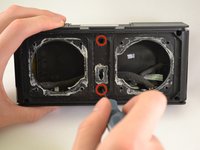
  9. Skullcandy Air Raid Battery Replacement, Control Buttons: step 9, image 1 of 1
    • Using a Phillips #00 Precision Screwdriver, unscrew two 6 mm screws from the middle of the panel, above and below volume buttons.

    Ask FixBot

    Add Comment

  10. Skullcandy Air Raid Battery Replacement: step 10, image 1 of 1
    • Lift the button panel.

    Ask FixBot

    Add Comment

  11. Skullcandy Air Raid Battery Replacement, Button Motherboard: step 11, image 1 of 1
    • Using a Phillips #00 Precision Screwdriver, unscrew two 6 mm screws from the button motherboard.

    Ask FixBot

    Add Comment

  12. Skullcandy Air Raid Battery Replacement: step 12, image 1 of 1
    • Using a plastic opening tool, pry the button motherboard to detach it from the device.

    • The button motherboard is connected to a ribbon cable inside the device.

    Ask FixBot

    Add Comment

  13. Skullcandy Air Raid Battery Replacement, Ribbon Cable: step 13, image 1 of 1
    • Pull the black ribbon cord attachment away from the motherboard.

    • Pull on the cable until it releases from the back of the motherboard.

    • The black attachment is part of the connector, not the blue ribbon cable, so it will not disconnect from the motherboard.

    Ask FixBot

    Add Comment

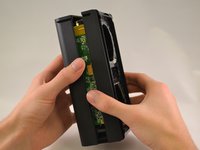
  14. Skullcandy Air Raid Battery Replacement, Back panel: step 14, image 1 of 2 Skullcandy Air Raid Battery Replacement, Back panel: step 14, image 2 of 2
    • Using a Phillips #00 Precision Screwdriver, unscrew two 8 mm screws.

    • Lift off the back panel.

    Ask FixBot

    Add Comment

  15. Skullcandy Air Raid Battery Replacement, Battery: step 15, image 1 of 1
    • Pull on the ribbon cable that connects the battery to the motherboard until the connector releases.

    Ask FixBot

    Add Comment

  16. Skullcandy Air Raid Battery Replacement, Removing Battery: step 16, image 1 of 1
    • Pull battery straight out until it is completely out of device.

    • If you are unable to loosen glue contact, use a heat gun to assist in removal.

    Ask FixBot

    Add Comment

  17. Skullcandy Air Raid Battery Replacement, Battery selection: step 17, image 1 of 1
    • The battery has 3 wires - the middle white wire is to prevent overheating so look for a 3 wire replacement battery.

    Ask FixBot

    Add Comment

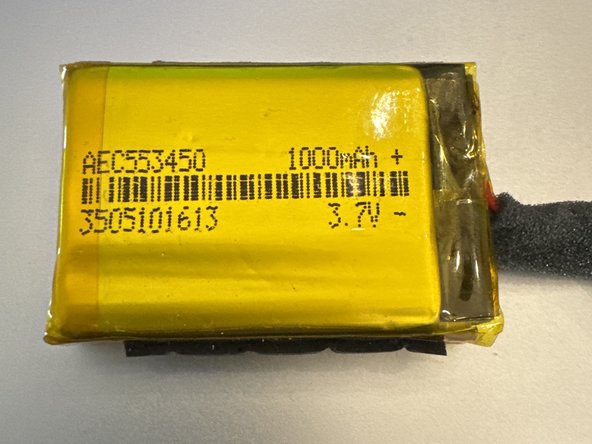
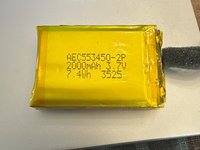
  18. Skullcandy Air Raid Battery Replacement, Replacement battery adaptation: step 18, image 1 of 2 Skullcandy Air Raid Battery Replacement, Replacement battery adaptation: step 18, image 2 of 2
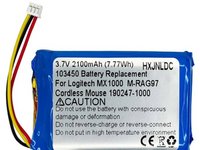
    • If you aren't able to source an official replacement battery, follow the next two steps for tips on alternate battery replacements.

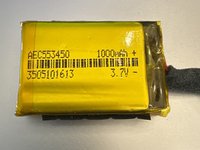
    • This is actually 2 × 1000mAh 3.7V batteries. The total is 2000mAhm, or 7.4Wh. The battery compartment is the limiting factor, so a replacement should be 10mm deep, 54mm long and 34mm wide.

    Ask FixBot

    Add Comment

  19. Skullcandy Air Raid Battery Replacement: step 19, image 1 of 3 Skullcandy Air Raid Battery Replacement: step 19, image 2 of 3 Skullcandy Air Raid Battery Replacement: step 19, image 3 of 3
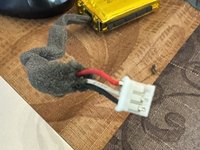
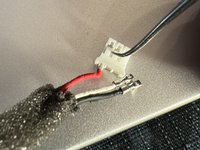
    • If you have a replacement battery picked out, you can remove and reorder the wires to fit the original connector. Pictured is an example replacement. This battery requires cutting and soldering the 3 leads from the old battery.

    Ask FixBot

    Add Comment

Conclusion

To reassemble your device, follow these instructions in reverse order.

Cancel: I did not complete this guide.

6 other people completed this guide.

7 Guide Comments

Hi, my name is Alex, and i have the same problem. The battery does not work anymore, but i don't know where can i find a replacement, and what is the its name. Or mabe something similar? I live in Romania so i need mabe an international online store to buy it. Thank you! My email is stanciualex_e@ yahoo.com

Alex - Reply Share

What is the type of battery?

grigoriev85 - Reply Share

I have the same issue. I want to acquire a replacement.

It is a rechargeable battery Model AEC553450-2P / 2000mA 3.7V 7.4Wh.

It there anybody out there who could help us I will appreciate it very much

Fernando Morales - Reply Share

I also need a battery, have you found one?

Noah Larsen - Reply Share

I have the same issue. I want to acquire a replacement.

It is a rechargeable battery Model AEC553450-2P / 2000mA 3.7V 7.4Wh.

It there anybody out there who could help us I will appreciate it very much

Noah Larsen - Reply Share

Add Comment

View Statistics:

Past 24 Hours: 3

Past 7 Days: 15

Past 30 Days: 113

All Time: 10,785