
SkullCandy Hesh Auxiliary Cable Replacement

Sarah Burk and 6 other contributors
Last updated on Apr 29, 2020
Views: 1.7K
View statistics:
- Past 24 Hours:
- 2
- Past 7 Days:
- 16
- Past 30 Days:
- 90
- All Time:
- 1,675
Comments: 0
No one has left comments on this guide. Will you be first?
Go to guide commentsCompleted: 0 1
No one has marked this guide "completed." Will you be the first?
1 person has marked this guide "completed." It's you — great job!
Favorites: 0 1
No one has favorited (and subscribed to) this guide. Will you be the first?
1 person has favorited (and subscribed to) this guide — and that's you!
Missing Steps
Oops! This guide is currently missing one or more important steps.
Introduction
Go to step 1 ↓In the case of a severed or frayed auxiliary cable, replacements can be purchased or salvaged from another broken device. This guide will show users how to replace it temporarily, without the use of a soldering gun.
What you need
Tools
-
-
Spudger4.9
-


-
-
-
Gently gripping the auxiliary cable of your headset, run your fingers down it's length, feeling for bumps or tears in the plastic sheathing. If there are multiple damaged areas, choose the one closest to the device.
 Ask FixBot
-
-
-
Using wire cutters, cut the auxiliary cable at the determined damaged area.
-
Next, cut your replacement cable to the same length of the removed portion of the damaged cable.
-
-
-
Using the spudger tool, grip and remove approximately an inch of the plastic sheath from the device's working wire and from the new auxiliary cable.
-
-
-
Use the spudger tool to remove the coating on the smaller colored wires inside the wire attached to the device and the new auxiliary cable.
-
Twist together the same colored wires from the device cable and the new cable.
-
-
-
-
Wrap each of the individual colored wires with electrical tape to insulate them from the other wires.
-
-
-
Secure all wires with a layer of electrical tape wrapped around the location of the splicing.
-
-


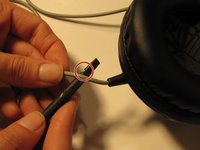
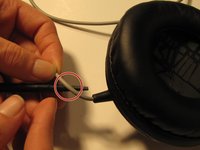


Test your device by plugging it into a compatible device using the auxiliary cable and playing a sound.

Team

USF Sarasota-Manatee, Team 1-1, Stewart Winter 2015 Member of USF Sarasota-Manatee, Team 1-1, Stewart Winter 2015
USFSM-STEWART-W15S1G1
4 Members
72 Guides authored
