
Side Panel Removal

Last updated on May 30, 2019
Views: 4.1K
View statistics:
- Past 24 Hours:
- 2
- Past 7 Days:
- 28
- Past 30 Days:
- 139
- All Time:
- 4,054
Comments: 1
1 guide comment.
Go to guide commentsCompleted: 7 8
7 people have marked this guide "completed." Will you be next?
8 people have marked this guide "completed." Including you — great job!
Favorites: 1 2
1 person has favorited (and subscribed to) this guide. Will you be next?
2 people have favorited (and subscribed to) this guide — including you!
Community-Contributed Guide
An awesome member of our community made this guide. It was not created by iFixit staff.
Introduction
Go to step 1 ↓How to remove the side panel on the HP Pavilion p6 desktop computer.
What you need
Tools

-
-
-
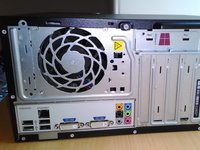
It is recomended to lay the computer down with the pull tab at the top to allow it to be easily opened.
 Ask FixBot
-
-
-




To reassemble your device, follow these instructions in reverse order.
Cancel: I did not complete this guide.
7 other people completed this guide.

