Free Shipping on Domestic Orders $75+

Shark Rotator Lift-Away Speed Brushroll Replacement

What you need

  1. Shark Rotator Lift-Away Speed Brushroll Replacement, Brushroll: step 1, image 1 of 1
    • Make sure the vacuum is turned off and unplugged before proceeding.

    • Locate the release button at the top of the vacuum pod next to the handle.

    • Use the handle to lift the pod up off of the vacuum nozzle while pressing the release button.

    • Removing the pod is optional, but it may be easier to locate blockages or access the motor and belt if you do so.

    Ask FixBot
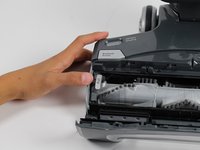
  2. Shark Rotator Lift-Away Speed Brushroll Replacement: step 2, image 1 of 2 Shark Rotator Lift-Away Speed Brushroll Replacement: step 2, image 2 of 2
    • Press the Brushroll Access buttons on the top of the nozzle to reveal the brushroll compartment.

    Ask FixBot
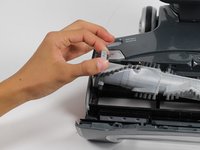
  3. Shark Rotator Lift-Away Speed Brushroll Replacement: step 3, image 1 of 2 Shark Rotator Lift-Away Speed Brushroll Replacement: step 3, image 2 of 2
    • Lift the brushroll out by using the pull-tab on the left side.

    • You can test the brushroll once it has been inserted by plugging the vacuum in and running the vacuum in carpet mode. The brushroll indicator light should be a solid green color.

    Ask FixBot
Conclusion

To reassemble your device, follow these instructions in reverse order.

Weston Mongomery

Member since: 10/02/17

201 Reputation

2 Guides authored

Team

Cal Poly, Team S15-G7, Livingston Fall 2017 Member of Cal Poly, Team S15-G7, Livingston Fall 2017

CPSU-LIVINGSTON-F17S15G7

4 Members

10 Guides authored

0 Guide Comments

Add Comment

View Statistics:

Past 24 Hours: 1

Past 7 Days: 10

Past 30 Days: 56

All Time: 2,121