Free Shipping on Domestic Orders $75+

Shark NV352 Roller Brush Replacement

What you need

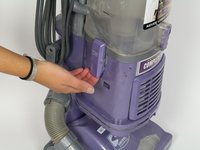
    1. Shark NV352 Roller Brush Replacement, Roller Brush: step 1, image 1 of 2 Shark NV352 Roller Brush Replacement, Roller Brush: step 1, image 2 of 2
      • Lift the latches on both sides of the vacuum to release the dust canister.

      • Remove the dust canister from the vacuum by lifting it up.

      Ask FixBot

      Add Comment

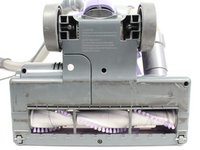
    2. Shark NV352 Roller Brush Replacement: step 2, image 1 of 1
      • Lay down the vacuum to access the bottom panel of the roller brush compartment.

      Ask FixBot

      Add Comment

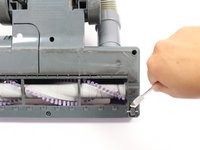
    3. Shark NV352 Roller Brush Replacement: step 3, image 1 of 2 Shark NV352 Roller Brush Replacement: step 3, image 2 of 2
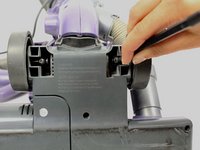
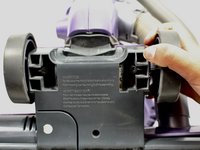
      • Using the metal spudger, pry the two small wheels located at the two bottom corners of the vacuum to remove them.

      Ask FixBot

      Add Comment

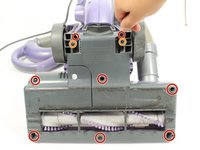
    4. Shark NV352 Roller Brush Replacement: step 4, image 1 of 2 Shark NV352 Roller Brush Replacement: step 4, image 2 of 2
      • Remove the eight 19mm Phillips #2 screws from the plastic cover.

      • Remove the two 14 mm Phillips #2 screws from the upper section of the plastic cover.

      Ask FixBot

      Add Comment

    5. Shark NV352 Roller Brush Replacement: step 5, image 1 of 2 Shark NV352 Roller Brush Replacement: step 5, image 2 of 2
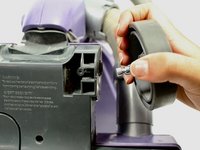
      • You will need to apply a strong force while pulling the wheels off because they are attached very tightly.

      • Remove the wheels by pulling them out of their axles, away from the vacuum.

      Ask FixBot

      Add Comment

    6. Shark NV352 Roller Brush Replacement: step 6, image 1 of 2 Shark NV352 Roller Brush Replacement: step 6, image 2 of 2
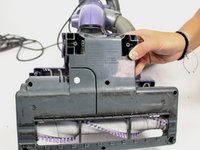
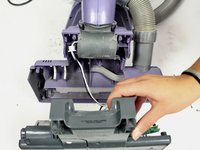
      • Perform the next step slowly and carefully so the wiring connecting the motherboard to the rest of the vacuum is not broken.

      • Gently pull the grey lower part of the roller brush compartment away from the purple upper part of the compartment.

      Ask FixBot

      Add Comment

    7. Shark NV352 Roller Brush Replacement: step 7, image 1 of 1
      • Lift up and then pull the roller belt off of the roller brush and the motor to remove it.

      Ask FixBot

      Add Comment

    8. Shark NV352 Roller Brush Replacement: step 8, image 1 of 1
      • Take out the roller brush by lifting it out of its tray.

      Ask FixBot

      Add Comment

Conclusion

To reassemble your device, follow these instructions in reverse order.

Cancel: I did not complete this guide.

9 other people completed this guide.

Amy Moran

Member since: 09/22/17

621 Reputation

2 Guides authored

Team

Cal Poly, Team S18-G5, Forte Fall 2017 Member of Cal Poly, Team S18-G5, Forte Fall 2017

CPSU-FORTE-F17S18G5

4 Members

60 Guides authored

1 Guide Comment

FOR SOME MODELS - THE BRUSH WILL NOT OPERATE IN AN UPRIGHT POSITION.

Shark navigator 350-353 series - if you have cleaned the roller and it doesn't work, TILT THE HANDLE BACK then try.

elaina heinz - Reply Share

Add Comment

View Statistics:

Past 24 Hours: 3

Past 7 Days: 41

Past 30 Days: 110

All Time: 6,752