
Seville Classics MSC10166 Disassembly

Queena Phung and 9 other contributors
Last updated on Jan 15, 2026
Views: 13K
View statistics:
- Past 24 Hours:
- 6
- Past 7 Days:
- 26
- Past 30 Days:
- 155
- All Time:
- 13,087
Comments: 1
1 comment on steps.
Completed: 2 3
2 people have marked this guide "completed." Will you be next?
3 people have marked this guide "completed." Including you — great job!
Favorites: 2 3
2 people have favorited (and subscribed to) this guide. Will you be next?
3 people have favorited (and subscribed to) this guide — including you!
Action Shots
Be an action hero! This guide needs images that better demonstrate how to perform specific actions.
Needs Better Images
Better photos will improve this guide. Help out by taking, editing, or uploading new ones!
Needs More Images
A few more images would make this guide's procedures crystal clear.
Missing Details
Some of this guide's details are missing. Help users by adding tools, difficulty, or time.
Introduction
Go to step 1 ↓This repair guide solves any rotation and vibration problems that the fan might have. The track at the bottom of the fan is the main source of rotation and vibration problems. Use the tear-down guide to remove all other components to get to the track.
What you need
Tools


-
-
-
Use the Phillips #2 screwdriver to remove the four 6 mm screws by unscrewing counterclockwise.
 Ask FixBot
-
-
-
Remove the Phillips 6 mm screw that holds the circuit board to the outer shell of the fan.
-
-
-
Remove the top cover containing the circuit board and the wires by pulling it away from the outer shell of the fan.
-
-
-
Remove the screws from the four corners of the circuit board.
-
Remove the circuit board from the top cover.
-
-
-
-
-
In order to remove the fan blade, use pliers to remove the holding nut.
-
After the holding nut is loose, use the pliers to pull up to remove the nut.
-
-
-
-
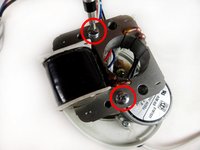
Remove the two bronze Phillips 29-mm bolts that hold the fan blade to the transformer.
-
Use a pair of pliers to hold the nut at the bottom of the transformer, as you unscrew from left-to-right at the top of the transformer. After, pull up and remove both the screw and nut.
-
-
-
Next, remove the two silver Phillips (8-mm head) 40-mm screws from the transformer.
-
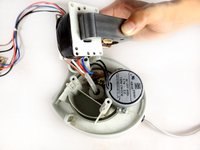
The transformer should be free after this step.
-
-
-
-
-
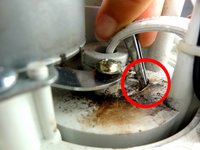
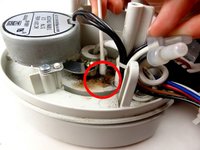
Clean the track, removing any obstructions.
-
Lubricate the track with grease.
-
-


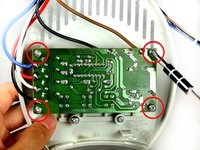
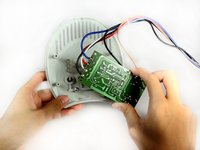


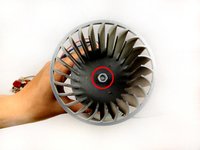
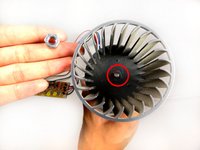




To reassemble your device, follow these instructions in reverse order.
Cancel: I did not complete this guide.
2 other people completed this guide.

Team

Cal Poly, Team 15-46, Forte Fall 2012 Member of Cal Poly, Team 15-46, Forte Fall 2012
CPSU-FORTE-F12S15G46
5 Members
72 Guides authored
