Free Shipping on Domestic Orders $75+

Service door disassembly

What you need

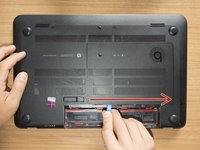
    1. Service door disassembly, Remove the battery: step 1, image 1 of 3 Service door disassembly, Remove the battery: step 1, image 2 of 3 Service door disassembly, Remove the battery: step 1, image 3 of 3
      • Turn the laptop upside down and gently lay it down on a flat surface.

      • Slide the battery release latch to the right and the battery will pop up slightly.

      • While keeping the latch slid with one hand, grab the battery with the other hand and remove it by pivoting it upward.

      • At this point some users would turn the laptop upside down once again and press the power button a couple of times. They say that this should help dissipating all of the remaining electricity around the device. Up to you :)

      Ask FixBot

      Add Comment

    1. Service door disassembly, Remove the captive screw of the service door: step 2, image 1 of 1
      • Remove the Phillips PM2.0×4.0 screw using a PH#00 screwdriver.

      Ask FixBot

      Add Comment

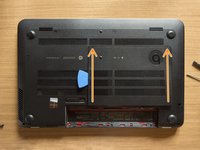
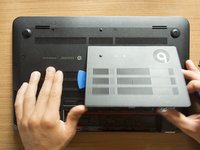
    2. Service door disassembly, Remove the service door: step 3, image 1 of 3 Service door disassembly, Remove the service door: step 3, image 2 of 3 Service door disassembly, Remove the service door: step 3, image 3 of 3
      • With an opening tool pry off the tabs that secure the service door to the base enclosure. Start with the long edge.

      • Continue along the short edges.

      • Once you have pried the service door off as it is in pic#3, it will come out of the rear edge very easily.

      Ask FixBot

      Add Comment

    3. Service door disassembly, Identify the components: step 4, image 1 of 1
      • RAM memory modules

      • HDD (Hard Disk Drive)

      • mSATA SSD slot

      • Wifi & BT module (Wireless card)

      Ask FixBot

      Add Comment

Conclusion

To reassemble your device, follow these instructions in reverse order.

Cancel: I did not complete this guide.

Roberto Bartolacci

Member since: 02/10/18

1,548 Reputation

9 Guides authored

0 Guide Comments

Add Comment

View Statistics:

Past 24 Hours: 1

Past 7 Days: 7

Past 30 Days: 39

All Time: 588