Free Shipping on Domestic Orders $75+

Scuf Instinct Pro Thumbstick Covers Replacement

  1. Scuf Instinct Pro Thumbstick Covers Replacement, Prepare your controller for disassembly: step 1, image 1 of 1
    • Unplug all cables from your controller before starting.

    • Completely power off your controller.

  2. Scuf Instinct Pro Thumbstick Covers Replacement, Remove the faceplate: step 2, image 1 of 3 Scuf Instinct Pro Thumbstick Covers Replacement, Remove the faceplate: step 2, image 2 of 3 Scuf Instinct Pro Thumbstick Covers Replacement, Remove the faceplate: step 2, image 3 of 3
    • Magnets secure the faceplace to the midframe.

    • Lift the top edge of the faceplate to release the magnets securing it.

    • Remove the faceplate.

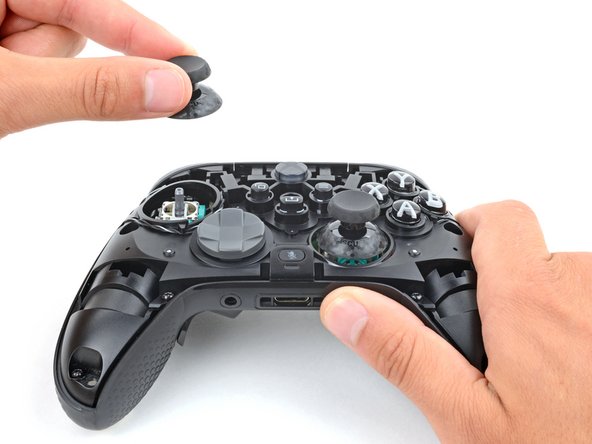
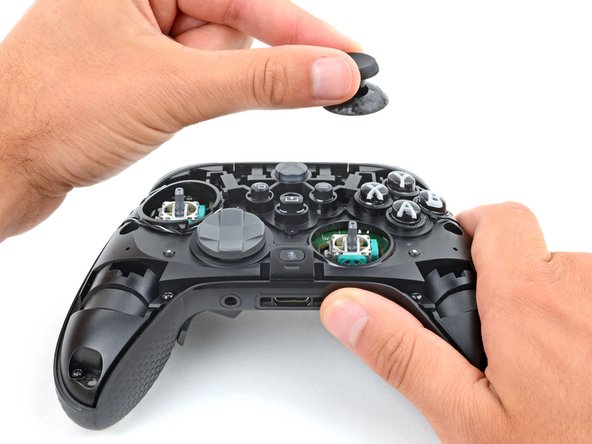
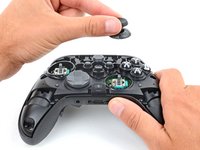
  3. Scuf Instinct Pro Thumbstick Covers Replacement, Remove the thumbstick covers: step 3, image 1 of 3 Scuf Instinct Pro Thumbstick Covers Replacement, Remove the thumbstick covers: step 3, image 2 of 3 Scuf Instinct Pro Thumbstick Covers Replacement, Remove the thumbstick covers: step 3, image 3 of 3
    • Firmly secure the controller with one hand, and use your other hand to lift the thumbstick covers straight off their modules.

    • This requires significant force. If you're having trouble, try wiggling the cover to help loosen it.

    • To install a thumbstick cover:

    • Place and rotate the cover on its module until it slides into place.

    • Firmly press down on the cover until it snaps into place or bottoms out.

Conclusion

To reassemble your device, follow these instructions in reverse order.

One other person completed this guide.

Spencer Day

Member since: 09/14/22

182,666 Reputation

1,165 Guides authored

Team

iFixit Member of iFixit

Staff

123 Members

25,507 Guides authored

0 Guide Comments

Add Comment

View Statistics:

Past 24 Hours: 1

Past 7 Days: 12

Past 30 Days: 74

All Time: 1,837