Introduction
Follow this guide to replace your broken fans in your Sapphire Nitro+ RX 6800 XT SE graphics card.
This graphics card uses 3mm JIS000 screws but you can use a Phillips screw driver as an alternative.
Note: This guide also works for the entire Sapphire Nitro+ RX 6000 series with a couple exceptions:
- The RX 6650 XT, RX 6750 XT, and RX 6950 XT Pure have a different blade design but the entire replacement process is the same.
- Only the RX 6800 XT SE, RX 6900 XT SE, RX 6950 XT, and RX 6950 XT Pure supports ARGB while the rest of the series does not.
What you need
-
-
-
Flip the fan over and notice the pins on the fan and in the graphics card fan slot:
-
Fan Pins
-
Fan slot
-
Flip the fan back over keeping the same orientation and carfully insert the fan.
-
-
-
Rescrew the JIS000 screw in the top of the fan.
-
Repeat steps 1 - 5 on the remaining fans if needed.
-

 Ask FixBot

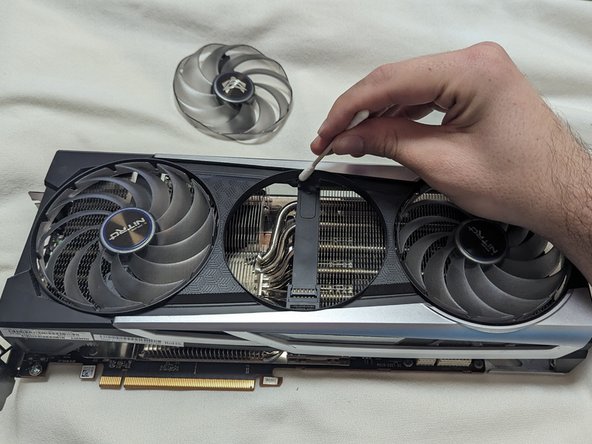


After assembly, the fans and RGB will work like new!
Cancel: I did not complete this guide.
One other person completed this guide.

Team

CSU Los Angeles, Team 5-25, Kershman Fall 2023 Member of CSU Los Angeles, Team 5-25, Kershman Fall 2023
CSULA-KERSHMAN-F23S5G25
1 Member
1 Guide authored
2 Guide Comments
What is the Screw used for this? I am having trouble finding a "3mm JIS 000" screw when I look it up. I accidentally dropped the screw somewhere in the pc when taking out the fan.
Hello, I'm trying to find the screw too! Did you find it by any chance where to get replacement?
