Free Shipping on Domestic Orders $75+

Samsung WB350F Rear Case Replacement

Views: 1.4K

View statistics:

Past 24 Hours:
3
Past 7 Days:
14
Past 30 Days:
91
All Time:
1,372
Comments: 0

No one has left comments on this guide. Will you be first?

Go to guide comments
Completed: 0

No one has marked this guide "completed." Will you be the first?

Favorites: 0

No one has favorited (and subscribed to) this guide. Will you be the first?

Time Required: No estimate
Difficulty: Easy
Samsung WB350F Rear Case Replacement

Introduction

Go to step 1 ↓

This guide will show you how to remove and replace the rear case of your Samsung WB350F.

What you need

Tools

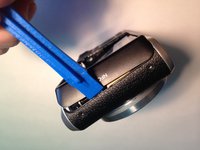
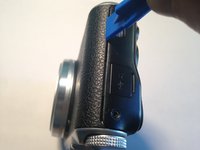
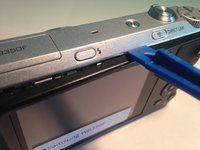
    1. Samsung WB350F Rear Case Replacement, Rear Case: step 1, image 1 of 3 Samsung WB350F Rear Case Replacement, Rear Case: step 1, image 2 of 3 Samsung WB350F Rear Case Replacement, Rear Case: step 1, image 3 of 3
      • Remove the wristlet strap.

      • If you have difficulties use your plastic spudger. If you don't have a plastic spudger, you can also use a pen/pencil.

      Ask FixBot

      Add Comment

    2. Samsung WB350F Rear Case Replacement: step 2, image 1 of 3 Samsung WB350F Rear Case Replacement: step 2, image 2 of 3 Samsung WB350F Rear Case Replacement: step 2, image 3 of 3
      • Remove five 3.2 mm screws with a Phillips #000 Screwdriver.

      • There is one silver screw on the bottom and two black screws on each side.

      • Keep the screws together for an easier re-assembly later.

      Ask FixBot

      Add Comment

    3. Samsung WB350F Rear Case Replacement: step 3, image 1 of 3 Samsung WB350F Rear Case Replacement: step 3, image 2 of 3 Samsung WB350F Rear Case Replacement: step 3, image 3 of 3
      • Open the case of the camera using your plastic opening tool.

      • Start on each end, working the tool into the opening and popping the casing up. Then work your way down the longer sides (top and bottom).

      • If you don’t have plastic opening tools, any flat plastic object, like a used gift card, can be used as an improvised alternative.

      Ask FixBot

      Add Comment

    4. Samsung WB350F Rear Case Replacement: step 4, image 1 of 1
      • Remove the plastic casing, exposing the inner workings of the camera.

      Ask FixBot

      Add Comment

Conclusion

To reassemble your device, follow these instructions in reverse order.

Cancel: I did not complete this guide.

Zachary Bourgault

Member since: 03/04/16

101 Reputation

1 Guide authored

Team

0 Guide Comments

Add Comment

View Statistics:

Past 24 Hours: 3

Past 7 Days: 14

Past 30 Days: 91

All Time: 1,372