
Samsung TL220 Power Button Replacement

chelsa and 3 other contributors
Last updated on May 7, 2024
Views: 723
View statistics:
- Past 24 Hours:
- 4
- Past 7 Days:
- 19
- Past 30 Days:
- 102
- All Time:
- 723
Comments: 0
No one has left comments on this guide. Will you be first?
Go to guide commentsCompleted: 2 3
2 people have marked this guide "completed." Will you be next?
3 people have marked this guide "completed." Including you — great job!
Favorites: 0 1
No one has favorited (and subscribed to) this guide. Will you be the first?
1 person has favorited (and subscribed to) this guide — and that's you!
Markup Mishap
This guide needs better markups. Help out by correcting or making some markup annotations.
Slice and Dice
The steps in this guide should be split up and made into a series of prerequisite guides.
Introduction
Go to step 1 ↓All you need for this guide is the will to fix your camera. Enjoy!
What you need
Tools


-
-
-
Check for debris and dust around the power button to make sure it's clean.
-
If dust is absent, then begin with unscrewing the seven outside shell 4 mm Philips screws with the Philips screw driver.
-
Now carefully pry open the back casing with the ifixit plastic opening tool.
 Ask FixBot
-
-
-
Now that you have the back casing off, gently remove the LCD screen from the camera.
-
Next unscrew the three 4 mm Philips screws on the back panel with the same screw driver(See image).
-
-
Tool used on this step:Tweezers$4.99
-
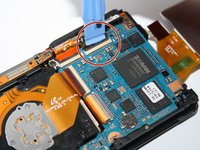
Unclip the four connecters that hold down the orange copper film strips with the plastic opening tool.
-
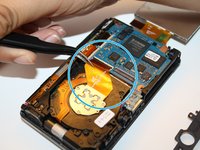
Then carefully pull out the three film strips with the ifixit tweezers.
-
-
-
Remove the 4 mm Philip screw located above the center film strip with the Philips screw driver. This will allow the top frame to come loose to take off.
-
-
-
Then pull back the black claw located at the bottom right of the camera, to the right with the plastic opening tool. This holds the main plate down.
-
-
-
-
Slowly lift with your fingers, the top frame of the camera to get to the power button.
-
-




To reassemble your device, follow these instructions in reverse order.
Cancel: I did not complete this guide.
2 other people completed this guide.


