
Samsung Sway Rear Cover Replacement

Chris Rush and 5 other contributors
Last updated on May 7, 2024
Views: 900
View statistics:
- Past 24 Hours:
- 2
- Past 7 Days:
- 26
- Past 30 Days:
- 103
- All Time:
- 900
Comments: 0
No one has left comments on this guide. Will you be first?
Go to guide commentsCompleted: 0 1
No one has marked this guide "completed." Will you be the first?
1 person has marked this guide "completed." It's you — great job!
Favorites: 0 1
No one has favorited (and subscribed to) this guide. Will you be the first?
1 person has favorited (and subscribed to) this guide — and that's you!
Better Introduction
Improve this guide by completing or revising its introduction.
What you need
Tools


-
-
-
-
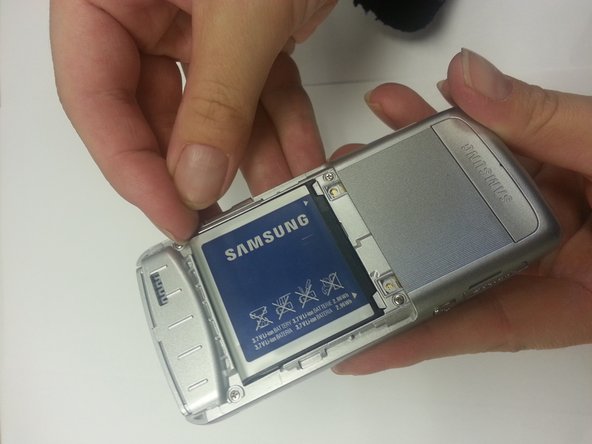
Using your finger, grasp the corner on either side of the battery and pull up.
-
-
-
Unscrew the four corner .4cm Phillips head screws and the two middle .3 cm Phillips head screws.
-
-
Tool used on this step:Tweezers$4.99
-
Gently insert a pair of tweezers under the Samsung logo on the bottom of the phone. Then unscrew the two .4 cm Phillips head screws underneath.
-
-
-
Gently insert the plastic opening tool into the seam where the battery was located. Work the opening tool around until the back cover comes off. Make sure to be careful of the side buttons that pop off.
-

 Ask FixBot




To reassemble your device, follow these instructions in reverse order.

Team

WRI115, Team 1-2, Ruszkiewicz Spring 2013 Member of WRI115, Team 1-2, Ruszkiewicz Spring 2013
WRI115-RUSZKIEWICZ-S13S1G2
4 Members
36 Guides authored
