
Samsung Series 5 UltraTouch Battery Replacement

Timothy and 11 other contributors
Last updated on Mar 10, 2020
Views: 28K
View statistics:
- Past 24 Hours:
- 4
- Past 7 Days:
- 32
- Past 30 Days:
- 125
- All Time:
- 28,149
Comments: 3
1 comment on steps, 2 guide comments.
Go to guide commentsCompleted: 14 15
14 people have marked this guide "completed." Will you be next?
15 people have marked this guide "completed." Including you — great job!
Favorites: 5 6
5 people have favorited (and subscribed to) this guide. Will you be next?
6 people have favorited (and subscribed to) this guide — including you!
Slice and Dice
The steps in this guide should be split up and made into a series of prerequisite guides.
Introduction
Go to step 1 ↓This guide will show how to remove the covers from the underside of the laptop, remove the battery, and replace it with the new battery.
What you need
Fix Kit
This kit contains all the parts and tools needed to complete this guide.

Parts

Tools


-
-
-
Power off the device. Remove the remaining screws holding the back cover in place:
-
Six 4.0 mm Phillips #00 screws.
-
Seven 6.7 mm Phillips #00 screws.
 Ask FixBot
-
-
-
Remove the two rubber pads concealing the final bottom case screws.
-
Remove the two 4 mm Phillips #00 screws found under these pads.
-
-
-
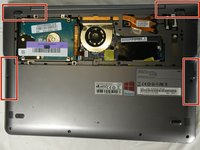
There are clips along the edges of the back cover that hold it in place. Be careful not to break these.
-
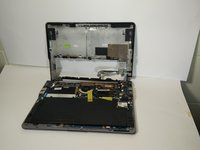
Remove the entire rest of the back cover.
-
-
-
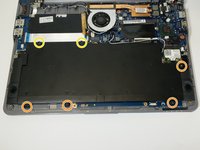
Remove the following Phillips 00 screws securing the battery:
-
Four 4.5 mm screws
-
Two 6.7 mm Phillips screws
-
-
-
-
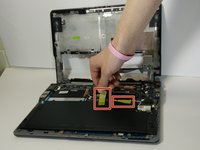
Pull the battery connector towards the battery to disconnect it.
-
-






To reassemble your device, follow these instructions in reverse order.
Cancel: I did not complete this guide.
14 other people completed this guide.

Team

USF Tampa, Team 16-3, Watkins Winter 2015 Member of USF Tampa, Team 16-3, Watkins Winter 2015
USFT-WATKINS-W15S16G3
4 Members
60 Guides authored
