Introduction
This guide will provide the steps necessary for replacing the screen in the Samsung SPH-A640 cellular telephone.
What you need
-
-
-
Turn the phone over on its backside.
-
Remove the bottom cover by sliding it downward, and then remove the battery.
-
-
-
-
Using a #00 Phillips screwdriver, remove four screws from the bottom half of the phone in the battery compartment. The screws are in each corner. Place screws off to the side.
-
-
-
Using a plastic opening tool, pry off back cover starting at the bottom corners and moving around the perimeter towards the hinge.
-
-
-
Tool used on this step:Tweezers$4.99
-
Using tweezers, carefully remove the buttons from both sides while removing the back cover.
-
-
-
Once the back is removed, use a plastic opening tool to disconnect the electrical connector near the hinge.
-
-
-
Peel off the screw covers and remove two exposed Phillips head screws with a small Phillips head screwdriver.
-
-
-
Remove the front cover of the phone using a plastic opening tool.
-
Slide a plastic opening tool along the seam from the hinge around the perimeter.
-
-
-
Using a plastic opening tool, disconnect the electrical connector. The electrical connector is located near the hinge and is revealed when the front cover is removed.
-
-
-
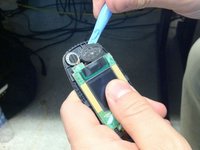
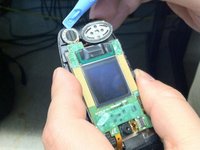
Using a plastic opening tool, pry the speakers from the case. These are located at the top of the back of the phone.
-
-
-
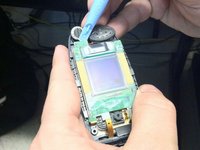
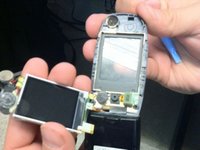
To the best of our knowledge, remove the hinge to free the ribbon cable from the case and remove the screen assembly.
-
-

 Ask FixBot




To reassemble your device, follow these instructions in reverse order.

Team

Ohio State, Team 1-2, Meza Spring 2014 Member of Ohio State, Team 1-2, Meza Spring 2014
OSU-MEZA-S14S1G2
4 Members
36 Guides authored
