
Samsung SPEX SCH-R210 Speaker Replacement

Susan and 7 other contributors
Last updated on May 29, 2024
Views: 782
View statistics:
- Past 24 Hours:
- 3
- Past 7 Days:
- 16
- Past 30 Days:
- 79
- All Time:
- 782
Comments: 0
No one has left comments on this guide. Will you be first?
Go to guide commentsCompleted: 2 3
2 people have marked this guide "completed." Will you be next?
3 people have marked this guide "completed." Including you — great job!
Favorites: 0 1
No one has favorited (and subscribed to) this guide. Will you be the first?
1 person has favorited (and subscribed to) this guide — and that's you!
Needs Better Images
Better photos will improve this guide. Help out by taking, editing, or uploading new ones!
Introduction
Go to step 1 ↓This guide is necessary for replacing the speaker of a Samsung SPEX SCH-R210. Replacing the speaker of the phone will help improve the the quality of the phone's volume. A new speaker will allow the phone to project sound more clearly and loudly. This process involves removing the back cover, the battery, and the plastic cover over the motherboard in order to locate the speaker. Hazards of this process may be any sharp pieces inside the phone underneath the cover that will be removed. The entire process must be done slowly, and carefully so that no damage is done to the phone. The motherboard is an important part of the phone's functional purpose and must not be damaged during the process. No specific skills are required while following this guide. When removing the screws keep them in a safe place. The screws will be used after replacing the speaker to put the cover back on the phone.
What you need
Tools

-
-
-
Lay the phone on its front side so the back is visible.
-
Use your thumb to gently and firmly press down on the triangle arrow found on the cover of the phone.
-
Press down on the arrow until you hear a popping sound, which will remove the cover of the phone.
-
Slide the cover down from the phone to remove it. Set the cover aside.
 Ask FixBot
-
-
-
-
-
Place your thumb on the edge of the battery near the access notch.
-
Lift the battery to remove it from the phone. Set the battery aside.
-
-
-
-
Use a Phillips #00 screwdriver to unscrew the four 3/16" screws holding the black plastic cover of the phone in place.
-
-
-
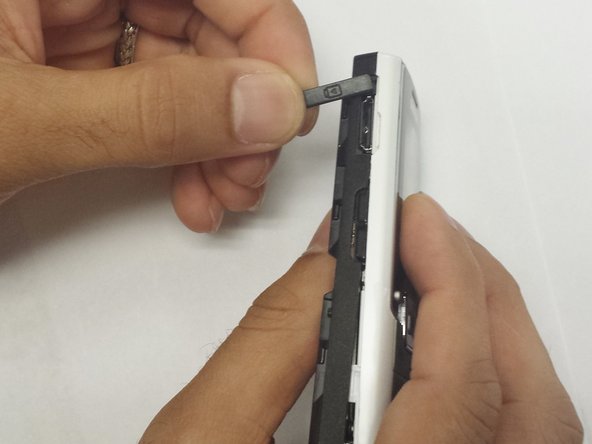
Remove the small, black headphone cover from the left side of the phone by gently pulling it off.
-
Remove the small, black volume cover from the right side of the phone by gentle pulling it off.
-
-
-
Remove the black plastic cover from the back of the phone by slowly pulling it off. This may take a little effort.
-
-
-
-
Once the plastic cover is removed, turn the cover over so that the insides are visible.
-
Using your fingernail, pry out the small, grey, circular speaker from the cover.
-
-




To reassemble your device, follow these instructions in reverse order.
Cancel: I did not complete this guide.
2 other people completed this guide.

Team

WRI115, Team 1-4, Ruszkiewicz Spring 2013 Member of WRI115, Team 1-4, Ruszkiewicz Spring 2013
WRI115-RUSZKIEWICZ-S13S1G4
3 Members
60 Guides authored
