Free Shipping on Domestic Orders $75+

Samsung SGH A707 Keypad Replacement

What you need

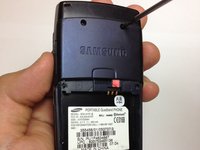
  1. Samsung SGH A707 Keypad Replacement, Battery: step 1, image 1 of 1
    • Press on the markings on the cover and pull it down to reveal the battery.

    Ask FixBot

    Add Comment

  2. Samsung SGH A707 Keypad Replacement: step 2, image 1 of 1
    • Use your fingers to pull the battery out of its position. You may also flip the phone and the battery will fall out.

    Ask FixBot

    Add Comment

  3. Samsung SGH A707 Keypad Replacement: step 3, image 1 of 1
    • Here is the phone without the battery.

    Ask FixBot

    Add Comment

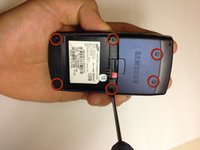
  4. Samsung SGH A707 Keypad Replacement, Motherboard: step 4, image 1 of 2 Samsung SGH A707 Keypad Replacement, Motherboard: step 4, image 2 of 2
    • Unscrew the six screws on the back of the phone using the Phillips #0 screw driver.

    Ask FixBot

    Add Comment

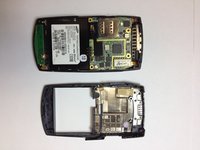
  5. Samsung SGH A707 Keypad Replacement: step 5, image 1 of 1
    • Use the prying tool the pry off the phone's plastic frame.

    Ask FixBot

    Add Comment

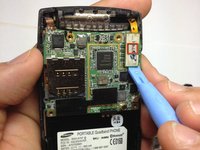
  6. Samsung SGH A707 Keypad Replacement: step 6, image 1 of 3 Samsung SGH A707 Keypad Replacement: step 6, image 2 of 3 Samsung SGH A707 Keypad Replacement: step 6, image 3 of 3
    • Use the prying tool to disconnect the rectangular connector.

    Ask FixBot

    Add Comment

  7. Samsung SGH A707 Keypad Replacement: step 7, image 1 of 1
    • Use the prying tool to disconnect the small connector.

    Ask FixBot

    Add Comment

  8. Samsung SGH A707 Keypad Replacement: step 8, image 1 of 1
    • Gently pull off the circuit board.

    Ask FixBot

    Add Comment

  9. Samsung SGH A707 Keypad Replacement: step 9, image 1 of 1
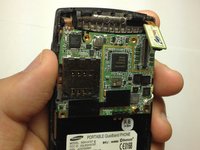
    • Here is the phone without the logic board.

    Ask FixBot

    Add Comment

  10. Samsung SGH A707 Keypad Replacement, Keypad: step 10, image 1 of 1
    • Hold the phone and gently separate the circuit board that holds the dome switches and the front face of the phone, revealing the rubber keyboard.

    Ask FixBot

    Add Comment

  11. Samsung SGH A707 Keypad Replacement: step 11, image 1 of 1
    • Here is the phone without the dome switch circuit board.

    Ask FixBot

    Add Comment

  12. Samsung SGH A707 Keypad Replacement: step 12, image 1 of 2 Samsung SGH A707 Keypad Replacement: step 12, image 2 of 2
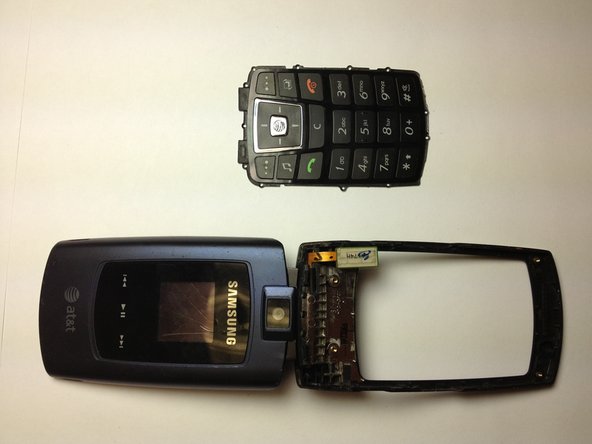
    • Here is the phone and the rubber keyboard.

    Ask FixBot

    Add Comment

  13. Samsung SGH A707 Keypad Replacement: step 13, image 1 of 1
    • Here is the rubber keyboard and the dome switch circuit board. A quick inspection of these elements can reveal keypad malfunctions. Look for dirt or debris that do not belong there.

    Ask FixBot

    Add Comment

Conclusion

To reassemble your device, follow these instructions in reverse order.

Cancel: I did not complete this guide.

yfm

Member since: 11/06/12

25 Reputation

7 Guides authored

0 Guide Comments

Add Comment

View Statistics:

Past 24 Hours: 2

Past 7 Days: 9

Past 30 Days: 39

All Time: 887