Free Shipping on Domestic Orders $75+

Samsung SCH-A670 Camera Replacement

What you need

  1. Samsung SCH-A670 Camera Replacement, Battery Cover: step 1, image 1 of 1
    • Slide the latch on the back of the phone up.

    Ask FixBot

    Add Comment

  2. Samsung SCH-A670 Camera Replacement, Battery: step 2, image 1 of 1
    • Remove the battery.

    Ask FixBot

    Add Comment

  3. Samsung SCH-A670 Camera Replacement, Logic Board: step 3, image 1 of 1
    • After removing the battery, remove the four small Phillips-head screws with a #0 Phillips screwdriver.

    Ask FixBot

    Add Comment

  4. Samsung SCH-A670 Camera Replacement: step 4, image 1 of 1
    • Using a thumbtack, pry the small plastic cover from the case near the base of the antenna.

    Ask FixBot

    Add Comment

  5. Samsung SCH-A670 Camera Replacement: step 5, image 1 of 1
    • With a #0 Phillips screwdriver remove the screw which you just uncovered.

    Ask FixBot

    Add Comment

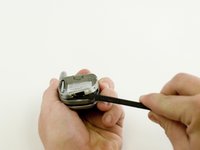
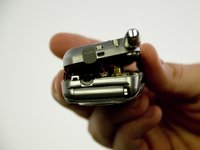
  6. Samsung SCH-A670 Camera Replacement: step 6, image 1 of 2 Samsung SCH-A670 Camera Replacement: step 6, image 2 of 2
    • Using the spudger, carefully pry the case apart starting near the charging port. Ease the case open.

    • Then disconnect the small power connector near the top of the phone.

    Ask FixBot

    Add Comment

  7. Samsung SCH-A670 Camera Replacement: step 7, image 1 of 1
    • Gently pry up the ribbon-type connector with the spudger.

    Ask FixBot

    Add Comment

  8. Samsung SCH-A670 Camera Replacement: step 8, image 1 of 1
    • Carefully pry the logic board from the case with the spudger.

    Ask FixBot

    Add Comment

  9. Samsung SCH-A670 Camera Replacement, Keypad: step 9, image 1 of 1
    • Once the logic board has been removed, peel the keypad up.

    Ask FixBot

    Add Comment

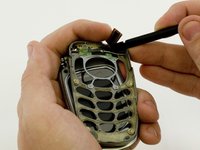
  10. Samsung SCH-A670 Camera Replacement, Keypad Housing: step 10, image 1 of 2 Samsung SCH-A670 Camera Replacement, Keypad Housing: step 10, image 2 of 2
    • When using a spudger the keypad housing comes off quite easily, although it may be necessary to guide the ribbon cable through the slot in the housing.

    Ask FixBot

    Add Comment

  11. Samsung SCH-A670 Camera Replacement, Screen Casing: step 11, image 1 of 1
    • Remove screws with #0 Phillips screwdriver.

    Ask FixBot

    Add Comment

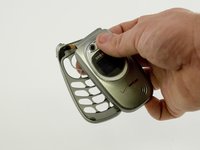
  12. Samsung SCH-A670 Camera Replacement: step 12, image 1 of 1
    • Carefully pry apart the casing with the spudger tool.

    Ask FixBot

    Add Comment

  13. Samsung SCH-A670 Camera Replacement, Screen: step 13, image 1 of 1
    • Use the spudger to carefully pry off the speaker.

    Ask FixBot

    Add Comment

  14. Samsung SCH-A670 Camera Replacement: step 14, image 1 of 1
    • Carefully pry off the ringer with the spudger.

    Ask FixBot

    Add Comment

  15. Samsung SCH-A670 Camera Replacement: step 15, image 1 of 1
    • Carefully pry off the screen with the spudger.

    Ask FixBot

    Add Comment

  16. Samsung SCH-A670 Camera Replacement, Camera: step 16, image 1 of 1
    • Gently pry off the camera with the spudger.

    Ask FixBot

    Add Comment

Conclusion

To reassemble your device, follow these instructions in reverse order.

Cancel: I did not complete this guide.

Nathan Brink

Member since: 04/11/10

19 Reputation

7 Guides authored

Team

Cal Poly, Team 34-59, Forte Spring 2010 Member of Cal Poly, Team 34-59, Forte Spring 2010

CPSU-FORTE-S10S34G59

4 Members

21 Guides authored

0 Guide Comments

Add Comment

View Statistics:

Past 24 Hours: 1

Past 7 Days: 10

Past 30 Days: 35

All Time: 4,440