
Samsung SC MX-20 Lens Replacement

Austin Williams and 3 other contributors
Last updated on Dec 11, 2019
Views: 614
View statistics:
- Past 24 Hours:
- 1
- Past 7 Days:
- 20
- Past 30 Days:
- 87
- All Time:
- 614
Comments: 0
No one has left comments on this guide. Will you be first?
Go to guide commentsCompleted: 0 1
No one has marked this guide "completed." Will you be the first?
1 person has marked this guide "completed." It's you — great job!
Favorites: 0 1
No one has favorited (and subscribed to) this guide. Will you be the first?
1 person has favorited (and subscribed to) this guide — and that's you!
Introduction
Go to step 1 ↓The lens of a camcorder is one of the most important components of the device. However, the lens is also susceptible to cracking and becoming dirty. A dirty/cracked lens may affect the outcome of the photographed results, so a replacement may be in order.
When the lens of a Samsung camcorder are damaged or non-functional, it would need to be replaced. This guide will show you how to remove the lens in your camcorder.
What you need
Tools


-
-
-
Unplug the cord connecting the LCD section of the device.
-
Remove the left face of the device.
-
Remove the top face by removing the three 4mm screws using a Phillips #000 screwdriver.
-
-
-
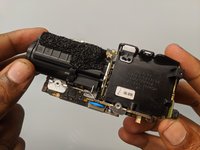
After removing the body of the device, unscrew the two 3.5mm Phillips #000 screws holding the battery compartment in place.
-
Remove the battery compartment.
-
-
-
-
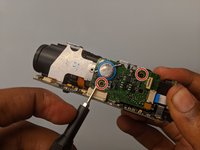
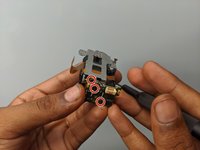
Remove the three 3.5mm Phillips #000 screws on the metal part from the lens component.
-
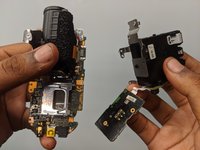
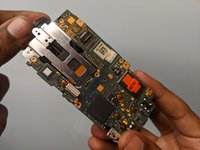
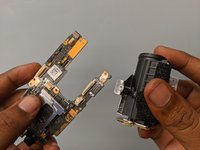
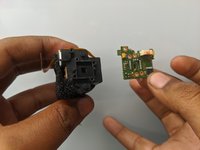
Remove the motherboard from the lens.
-
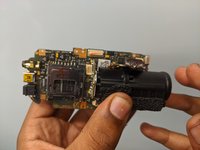
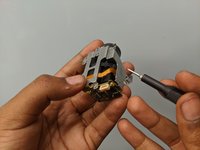
Remove the lens from the lens assembly.
-


 Ask FixBot






To reassemble your device, follow these instructions in reverse order.

Team

Embry-Riddle Aeronautical University, Team S15-G1, Lamothe Fall 2019 Member of Embry-Riddle Aeronautical University, Team S15-G1, Lamothe Fall 2019
ERAU-LAMOTHE-F19S15G1
4 Members
48 Guides authored
