
Samsung SC MX-20 Hand Strap Replacement

Iyiola kofo-abayomi and 3 other contributors
Last updated on Dec 11, 2019
Views: 840
View statistics:
- Past 24 Hours:
- 3
- Past 7 Days:
- 12
- Past 30 Days:
- 80
- All Time:
- 840
Comments: 0
No one has left comments on this guide. Will you be first?
Go to guide commentsCompleted: 0 1
No one has marked this guide "completed." Will you be the first?
1 person has marked this guide "completed." It's you — great job!
Favorites: 0 1
No one has favorited (and subscribed to) this guide. Will you be the first?
1 person has favorited (and subscribed to) this guide — and that's you!
Action Shots
Be an action hero! This guide needs images that better demonstrate how to perform specific actions.
Needs Better Images
Better photos will improve this guide. Help out by taking, editing, or uploading new ones!
Missing Details
Some of this guide's details are missing. Help users by adding tools, difficulty, or time.
Introduction
Go to step 1 ↓When you use your camcorder to record video, you’ll find that the hand strap is one of the most useful components to stabilize your image/video. The hand strap in your device is likely to wear out and become unusable. If you’re looking to replace a worn out or damaged hand strap, follow the steps in this guide.
What you need
Tools


 Ask FixBot


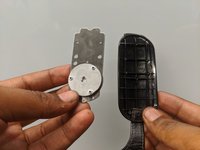
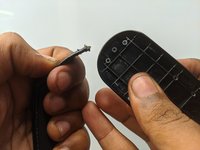
To reassemble your device, follow these instructions in reverse order.

Team

Embry-Riddle Aeronautical University, Team S15-G1, Lamothe Fall 2019 Member of Embry-Riddle Aeronautical University, Team S15-G1, Lamothe Fall 2019
ERAU-LAMOTHE-F19S15G1
4 Members
48 Guides authored
