
Samsung S85 Screen Replacement

Avinash Salgam and 3 other contributors
Last updated on May 7, 2024
Views: 1.3K
View statistics:
- Past 24 Hours:
- 3
- Past 7 Days:
- 19
- Past 30 Days:
- 109
- All Time:
- 1,281
Comments: 1
1 comment on steps.
Completed: 1 2
1 person has marked this guide "completed." Will you be next?
2 people have marked this guide "completed." Including you — great job!
Favorites: 0 1
No one has favorited (and subscribed to) this guide. Will you be the first?
1 person has favorited (and subscribed to) this guide — and that's you!
Introduction
Go to step 1 ↓This guide will explain how to successfully remove the screen underneath the outside shell and on top of the circuit board.
What you need
Tools


-
-
-
Remove 4 screws from bottom of camera
-
Remove 2 screws from side of camera
-
Remove 2 screws from side of camera
 Ask FixBot
-
-
-
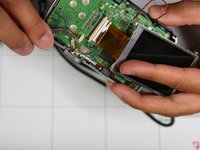
Squeeze area noted by blue square and pull outside shell apart from remaining camera.
-
-
-
Tool used on this step:Tweezers$4.99
-
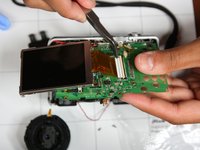
Lift screen up such that orange circuit ribbon fully extends
-
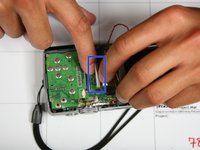
Flip white peg up noted by blue box
-
Using tweezers gently remove orange circuit ribbon from white peg. Make sure white peg remains up otherwise ribbon may tear.
-
-


To reassemble your device, follow these instructions in reverse order.
Cancel: I did not complete this guide.
One other person completed this guide.

Team

University of Illinois Urbana-Champaign, Team 1-4, Scrogum Spring 2014 Member of University of Illinois Urbana-Champaign, Team 1-4, Scrogum Spring 2014
UICU-SCROGUM-S14S1G4
4 Members
60 Guides authored
