Free Shipping on Domestic Orders $75+

Samsung Rogue Motherboard Replacement

Prerequisite Only
This is a prerequisite-only guide! This guide is part of another procedure and isn’t meant to be used alone.

What you need

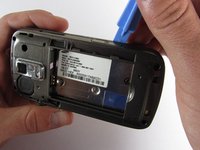
  1. Samsung Rogue Motherboard Replacement, Motherboard: step 1, image 1 of 1
    • Use a plastic opening tool to carefully pry the back cover surrounding the camera up from the phone.

  2. Samsung Rogue Motherboard Replacement: step 2, image 1 of 1
    • Remove the five 3.4mm Philips screws securing the backing of the phone.

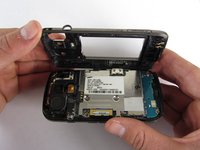
  3. Samsung Rogue Motherboard Replacement: step 3, image 1 of 3 Samsung Rogue Motherboard Replacement: step 3, image 2 of 3 Samsung Rogue Motherboard Replacement: step 3, image 3 of 3
    • Use a plastic opening tool to carefully pry off the back cover.

    • Make sure you are prying along the edge and not between the two halves of the phone that slide away from each other.

    • Be careful to not drop the volume changing piece, for it can easily slip out.

  4. Samsung Rogue Motherboard Replacement: step 4, image 1 of 1
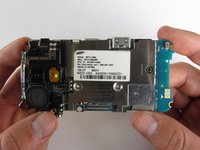
    • Remove the two 3.45 mm Philips screws below the white sticker.

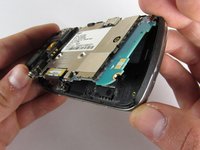
  5. Samsung Rogue Motherboard Replacement: step 5, image 1 of 2 Samsung Rogue Motherboard Replacement: step 5, image 2 of 2
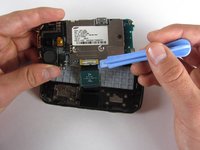
    • Carefully lift the motherboard up from the bottom edge.

    • The film of wires is still attached to the motherboard, so do not completely remove the motherboard just yet or you may damage it.

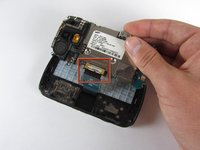
  6. Samsung Rogue Motherboard Replacement: step 6, image 1 of 2 Samsung Rogue Motherboard Replacement: step 6, image 2 of 2
    • Use a plastic opening tool to disconnect the film from the motherboard.

Conclusion

To reassemble your device, follow these instructions in reverse order.

Viktoria Mikoultchik

Member since: 04/15/12

25 Reputation

7 Guides authored

Team

Cal Poly, Team 7-32, Maness Spring 2012 Member of Cal Poly, Team 7-32, Maness Spring 2012

CPSU-MANESS-S12S7G32

4 Members

20 Guides authored

0 Guide Comments

Add Comment

View Statistics:

Past 24 Hours: 1

Past 7 Days: 5

Past 30 Days: 19

All Time: 328