Free Shipping on Domestic Orders $75+

Samsung Refrigerator Light (Refrigerator Compartment) Replacement

Views: 2.3K

View statistics:

Past 24 Hours:
4
Past 7 Days:
87
Past 30 Days:
329
All Time:
2,342
Comments: 4

2 comments on steps, 2 guide comments.

Go to guide comments
Completed: 0

No one has marked this guide "completed." Will you be the first?

Favorites: 0

No one has favorited (and subscribed to) this guide. Will you be the first?

Time Required: 1 - 10 minutes
Difficulty: Moderate
Samsung Refrigerator Light (Refrigerator Compartment) Replacement

Introduction

Go to step 1 ↓

This guide shows how to remove and replace the refrigerator light in your Samsung refrigerator.

The Samsung fridge uses LED strips, which shouldn't break often. If your refrigerator compartment doesn't light up when you open the door, you may need to replace the light.

This guide will work for most Samsung Refrigerators . This guide is based on a model RF28R7201SG Refrigerator. If you have a different model, you may encounter some minor disassembly differences, but the overall repair process will be the same.

What you need

Tools

    1. Samsung Refrigerator Light (Refrigerator Compartment) Replacement, Unplug your refrigerator: step 1, image 1 of 1
      • Unplug your refrigerator before you begin your repair.

      • If you are testing or repairing the following items, you may also need to shut off and disconnect the water supply:

      • Condenser fan motor

      • Compressor motor and thermal overload device

      • Water supply valve assembly

      Ask FixBot

      Add Comment

    1. Samsung Refrigerator Light (Refrigerator Compartment) Replacement, Open the refrigerator doors: step 2, image 1 of 2 Samsung Refrigerator Light (Refrigerator Compartment) Replacement, Open the refrigerator doors: step 2, image 2 of 2
      • Open both French doors for the refrigerator compartment.

      Ask FixBot

      Add Comment

    1. Samsung Refrigerator Light (Refrigerator Compartment) Replacement, Remove the light cover: step 3, image 1 of 3 Samsung Refrigerator Light (Refrigerator Compartment) Replacement, Remove the light cover: step 3, image 2 of 3 Samsung Refrigerator Light (Refrigerator Compartment) Replacement, Remove the light cover: step 3, image 3 of 3
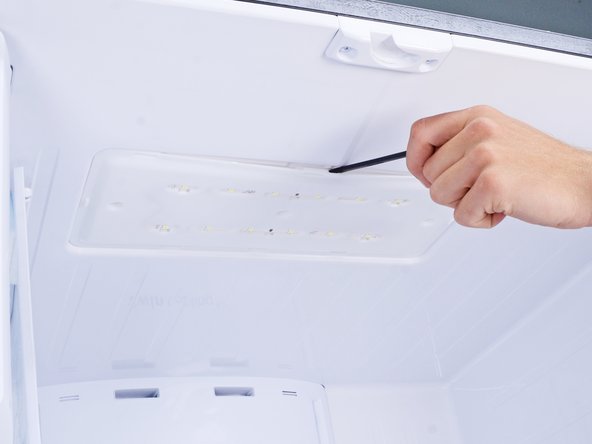
      • Plastic clips hold the light cover in place.

      • Use a spudger to pry along the back edge of the light cover.

      • You can also use a flathead screwdriver, but be careful not to let the screwdriver slip, or you'll scratch your refrigerator surface.

      • Remove the light cover.

      Ask FixBot

      Add Comment

    1. Samsung Refrigerator Light (Refrigerator Compartment) Replacement, Remove the light panel: step 4, image 1 of 1
      • Remove the screws securing the light panel.

      Ask FixBot

      Add Comment

    2. Samsung Refrigerator Light (Refrigerator Compartment) Replacement: step 5, image 1 of 3 Samsung Refrigerator Light (Refrigerator Compartment) Replacement: step 5, image 2 of 3 Samsung Refrigerator Light (Refrigerator Compartment) Replacement: step 5, image 3 of 3
      • Use a spudger or a flathead screwdriver to pry and loosen the light panel.

      • Don't try to remove the light panel yet, as it's connected to the refrigerator with a cable.

      Ask FixBot

      Add Comment

    3. Samsung Refrigerator Light (Refrigerator Compartment) Replacement: step 6, image 1 of 2 Samsung Refrigerator Light (Refrigerator Compartment) Replacement: step 6, image 2 of 2
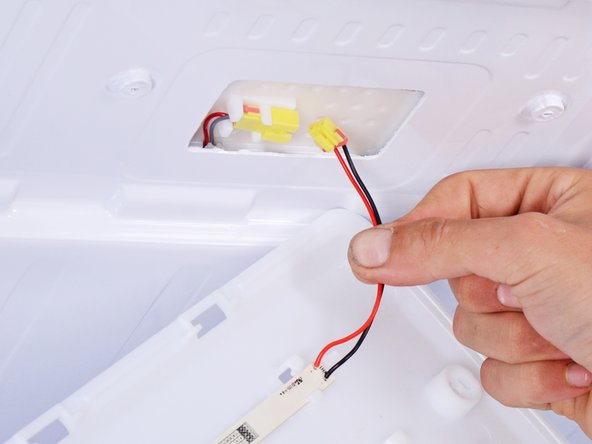
      • Use your fingers to unplug the light's wire connector.

      Ask FixBot

      Add Comment

    4. Samsung Refrigerator Light (Refrigerator Compartment) Replacement: step 7, image 1 of 1
      • Remove the refrigerator light.

      Ask FixBot

      Add Comment

Conclusion

To reassemble your device, follow these instructions in reverse order.

Take your e-waste to an R2 or e-Stewards certified recycler.

Repair didn’t go as planned? Ask our Answers Community for help.

Cancel: I did not complete this guide.

nicO

Member since: 04/14/15

15,990 Reputation

88 Guides authored

Team

Team Vulcan Member of Team Vulcan

Staff

6 Members

1,884 Guides authored

2 Guide Comments

I have a Samsung Refrigerator not sure what its called but it between the french doors a plastic stripe that is on the left side of door

Donna - Reply Share

I believe that the strip between the doors that folds back when the doors are opened is called a mullion strip. It allows the doors to be sealed when closed, but moves out of the way when the doors are opened.

Bill Gilbert - Reply Share

Add Comment

View Statistics:

Past 24 Hours: 4

Past 7 Days: 87

Past 30 Days: 329

All Time: 2,342