
Samsung RS261MDRS Water Filter Replacement

Brennan Kamealoha and one other contributor
Last updated on Jun 26, 2026
Views: 238
View statistics:
- Past 24 Hours:
- 1
- Past 7 Days:
- 14
- Past 30 Days:
- 91
- All Time:
- 238
Comments: 0
No one has left comments on this guide. Will you be first?
Go to guide commentsCompleted: 0 1
No one has marked this guide "completed." Will you be the first?
1 person has marked this guide "completed." It's you — great job!
Favorites: 0 1
No one has favorited (and subscribed to) this guide. Will you be the first?
1 person has favorited (and subscribed to) this guide — and that's you!
Introduction
Go to step 1 ↓This guide will show you how to locate, remove, and replace the water filter in the Samsung RS261MDBP refrigerator. Replacing the filter regularly helps keep your water clean and ensures proper flow.
The steps will walk you through opening the filter housing, removing the old filter, and installing a new one. No special tools are required.
Before starting, have a replacement filter ready and place a towel underneath the filter area to catch any small amount of water that may spill.
What you need
-
-
-
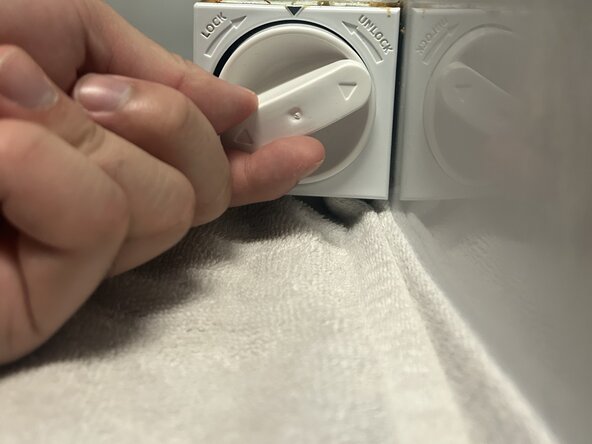
Open the refrigerator and locate the filter housing. You’ll see a round knob labeled LOCK / UNLOCK.
 Ask FixBot
-
-
-
Place a towel directly under the filter. This prevents water from spilling onto the fridge surface.
-
-
-
Grip the knob firmly. Turn it clockwise (toward UNLOCK) about a quarter turn.
-
-
-
-
Insert the new filter into the slot. Push it in until it is completely seated.
-
-
-
Push inward with force and turn the knob counterclockwise (back to LOCK). Ensure you tighten it completely.
-
-





Team

Austin Community College, Team B-6, Serna Spring 2026 Member of Austin Community College, Team B-6, Serna Spring 2026
AUSTINCC-SERNA-S26SBG6
1 Member
12 Guides authored
