Introduction
Follow this guide to safely remove the battery to your Samsung Series 9 (NP900X4B-A02) Laptop. These instructions will resolve any issues involved with poor battery performance. No extra skills are required for this guide, meaning anyone can replace their laptop battery!
Before completing this guide ensure that the laptop is unplugged and turned off.
If the battery appears to be swollen, use extreme caution when removing the battery.
What you need
-
-
-
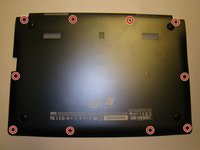
Remove the ten screws along the base using a Phillips #000.
-
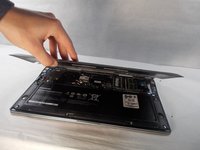
Use a Plastic Opening Tool to pry open the base .
 Ask FixBot
-
-
-
The battery is now unobstructed from your view.
-
Before removing the battery, use the plastic opening tool to detach the ribbon wire cable that connects the battery to the motherboard.
-
-
-
-
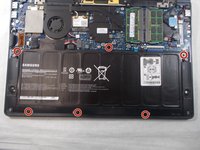
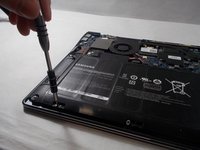
Use the Phillips #000 screwdriver to remove six screws that are holding the battery in place.
-
-





To reassemble your device, follow the above steps in reverse order.

Team

UMass Dartmouth, Team S4-G6, Valliere Fall 2018 Member of UMass Dartmouth, Team S4-G6, Valliere Fall 2018
UMASSD-VALLIERE-F18S4G6
5 Members
72 Guides authored
