Free Shipping on Domestic Orders $75+

Samsung NP300E5C Hard Drive Replacement

What you need

    1. Samsung NP300E5C Hard Drive Replacement, Battery: step 1, image 1 of 1
      • Lay laptop down so that the bottom is facing the sky.

      Ask FixBot

      Add Comment

    2. Samsung NP300E5C Hard Drive Replacement: step 2, image 1 of 3 Samsung NP300E5C Hard Drive Replacement: step 2, image 2 of 3 Samsung NP300E5C Hard Drive Replacement: step 2, image 3 of 3
      • Push both tabs away from the center of the device.

      • While both are in the fully unlocked position, slide the battery out.

      Ask FixBot

      Add Comment

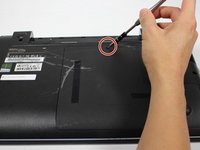
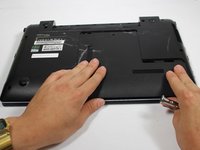
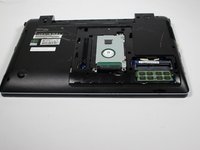
    1. Samsung NP300E5C Hard Drive Replacement, Hard Drive: step 3, image 1 of 3 Samsung NP300E5C Hard Drive Replacement, Hard Drive: step 3, image 2 of 3 Samsung NP300E5C Hard Drive Replacement, Hard Drive: step 3, image 3 of 3
      • Remove this 4 mm Phillips #8 screw using a Phillips #00 screwdriver.

      • Firmly, but gently pull the cover towards you.

      • After moving the cover about 2 centimeters, you can lift and remove it.

      Ask FixBot

      Add Comment

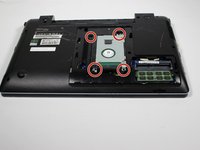
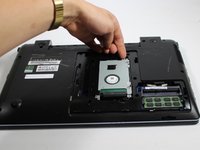
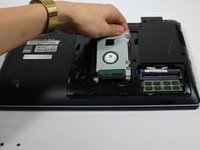
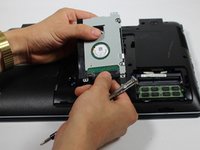
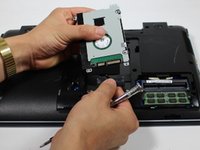
    2. Samsung NP300E5C Hard Drive Replacement: step 4, image 1 of 3 Samsung NP300E5C Hard Drive Replacement: step 4, image 2 of 3 Samsung NP300E5C Hard Drive Replacement: step 4, image 3 of 3
      • Remove these four 4 mm Phillips #8 screws using a Phillips #00 screwdriver.

      • Gently lift the hard drive up, however do not remove it.

      Ask FixBot

      Add Comment

    3. Samsung NP300E5C Hard Drive Replacement: step 5, image 1 of 2 Samsung NP300E5C Hard Drive Replacement: step 5, image 2 of 2
      • Firmly grasp the base of the connector at the bottom of the hard drive.

      • Gently pull the connector off to free the hard drive.

      Ask FixBot

      Add Comment

Conclusion

To reassemble your device, follow these instructions in reverse order.

Cancel: I did not complete this guide.

11 other people completed this guide.

aliahsan95

Member since: 09/23/15

937 Reputation

4 Guides authored

Team

Baylor, Team 10-13, Williams Fall 2015 Member of Baylor, Team 10-13, Williams Fall 2015

BU-WILLIAMS-F15S10G13

3 Members

48 Guides authored

2 Guide Comments

I want to change this HDD with a SSD drive. How do I know which drive to look for? Do i need some kind of adapter or i just have to plug it?

johnetix - Reply Share

The HDD is connected using Serial ATA (SATA) and most modern SSD drives will also use a SATA connection. You will be able to install the new drive without any adapters.

Oscar B - Reply Share

Add Comment

View Statistics:

Past 24 Hours: 4

Past 7 Days: 32

Past 30 Days: 129

All Time: 14,002