Introduction
We are going to teach someone how to remove the battery in four easy steps. This is the first necessary step that will allow you to remove the back panel to replace other internal components.
-
-
-
Turn off the computer.
-
Disconnect the charging cable from the laptop.
-
Flip the laptop upside down with the front face down on a flat surface.
 Ask FixBot
-
-
-
-
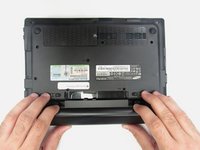
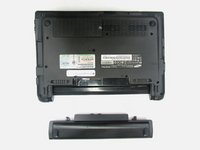
While holding the left and right hand switches in the "unlocked" position, push the battery away from the computer.
-
-


Conclusion
To reassemble your device, follow these instructions in reverse order.

Team

Eastern Washington University, Team 2-3, Andersen Spring 2016 Member of Eastern Washington University, Team 2-3, Andersen Spring 2016
EWU-ANDERSEN-S16S2G3
5 Members
72 Guides authored
