Free Shipping on Domestic Orders $75+

Samsung L100 flash assembly replacement

Views: 4.7K

View statistics:

Past 24 Hours:
2
Past 7 Days:
14
Past 30 Days:
107
All Time:
4,727
Comments: 1

1 comment on steps.

Completed: 1

1 person has marked this guide "completed." Will you be next?

Favorites: 1

1 person has favorited (and subscribed to) this guide. Will you be next?

Time Required: 15 minutes
Difficulty: Moderate
Samsung L100 flash assembly replacement

Introduction

Go to step 1 ↓

Flash bulb soldered to circuit board with capacitor, so it is not possible to only replace flash bulbs.

What you need

Parts

Tools

    1. Samsung L100 flash assembly replacement, Removing Back Cover: step 1, image 1 of 3 Samsung L100 flash assembly replacement, Removing Back Cover: step 1, image 2 of 3 Samsung L100 flash assembly replacement, Removing Back Cover: step 1, image 3 of 3
      • Remove the six external screws from the camera using a Phillips #0 screwdriver.

      • After the screws has been removed, the bottom of the back half of the external case should be loosened from the camera.

      • Be careful, make sure you don't lose the screws.

      Ask FixBot

      Add Comment

    2. Samsung L100 flash assembly replacement: step 2, image 1 of 2 Samsung L100 flash assembly replacement: step 2, image 2 of 2
      • Open the battery cover that's located on the bottom right side of the camera and carefully remove the battery.

      Ask FixBot

      Add Comment

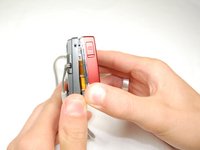
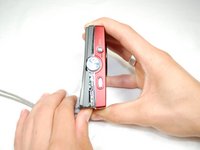
    3. Samsung L100 flash assembly replacement: step 3, image 1 of 3 Samsung L100 flash assembly replacement: step 3, image 2 of 3 Samsung L100 flash assembly replacement: step 3, image 3 of 3
      • Slide your fingernail or a plastic spudger in the groove from the bottom to the top right side of the camera.

      Ask FixBot

      Add Comment

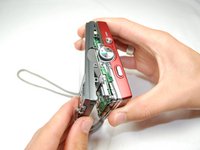
    4. Samsung L100 flash assembly replacement: step 4, image 1 of 1
      • Carefully squeeze the top right corner of the camera and pry off the external cover.

      • If you hear a "cracking" sound. This is normal.

      • Continue to pull the external cover and it will come off cleanly.

      • Be cautious of the flash capacitor. It carries an electrical charge, that may give you an unpleasant shock.

      Ask FixBot

      Add Comment

    5. Samsung L100 flash assembly replacement: step 5, image 1 of 1
      • Carefully pull off the back cover, parts behind the back of the case might fall out.

      Ask FixBot

      Add Comment

    1. Samsung L100 flash assembly replacement, Flash Circuit Board: step 6, image 1 of 1
      • Remove the screws holding the circuit board.

      • After you remove the screws, carefully remove the circuit board.

      Ask FixBot

      Add Comment

    2. Samsung L100 flash assembly replacement: step 7, image 1 of 2 Samsung L100 flash assembly replacement: step 7, image 2 of 2
      • Remove the front cover, it comes off easily.

      • Buttons might fall out when you remove the front cover.

      Ask FixBot

      Add Comment

    3. Samsung L100 flash assembly replacement: step 8, image 1 of 1
      • Face camera towards you.

      • Remove the two screws from circuit board on the left side of the lens.

      Ask FixBot

      Add Comment

    4. Samsung L100 flash assembly replacement: step 9, image 1 of 1
      • Carefully hold up the circuit board, while it's still connected to the camera.

      • Remove all five screws that's on top of the camera.

      Ask FixBot

      Add Comment

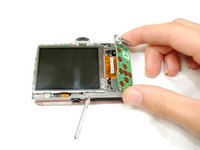
    5. Samsung L100 flash assembly replacement: step 10, image 1 of 3 Samsung L100 flash assembly replacement: step 10, image 2 of 3 Samsung L100 flash assembly replacement: step 10, image 3 of 3
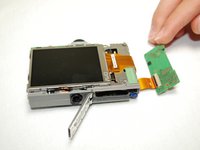
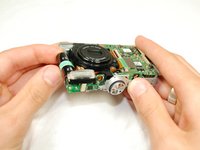
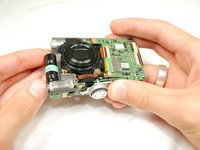
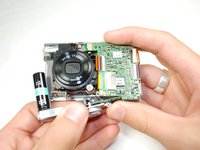
      • Carefully push up the top of the circuit board.

      • Pull up flash circuit board from top of camera.

      Ask FixBot

      Add Comment

Conclusion

To reassemble your device, follow these instructions in reverse order.

Cancel: I did not complete this guide.

One other person completed this guide.

Adriel

Member since: 04/15/10

138 Reputation

2 Guides authored

Team

Cal Poly, Team 6-17, Maness Spring 2010 Member of Cal Poly, Team 6-17, Maness Spring 2010

CPSU-MANESS-S10S6G17

4 Members

60 Guides authored

0 Guide Comments

Add Comment

View Statistics:

Past 24 Hours: 2

Past 7 Days: 14

Past 30 Days: 107

All Time: 4,727