Free Shipping on Domestic Orders $75+

Samsung L100 LCD Screen Replacement

What you need

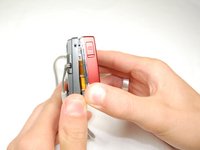
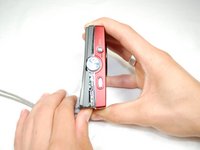
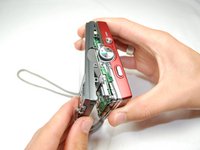
  1. Samsung L100 LCD Screen Replacement, Removing Back Cover: step 1, image 1 of 3 Samsung L100 LCD Screen Replacement, Removing Back Cover: step 1, image 2 of 3 Samsung L100 LCD Screen Replacement, Removing Back Cover: step 1, image 3 of 3
    • Remove the six external screws from the camera using a Phillips #0 screwdriver.

    • After the screws has been removed, the bottom of the back half of the external case should be loosened from the camera.

    • Be careful, make sure you don't lose the screws.

    Ask FixBot

    Add Comment

  2. Samsung L100 LCD Screen Replacement: step 2, image 1 of 2 Samsung L100 LCD Screen Replacement: step 2, image 2 of 2
    • Open the battery cover that's located on the bottom right side of the camera and carefully remove the battery.

    Ask FixBot

    Add Comment

  3. Samsung L100 LCD Screen Replacement: step 3, image 1 of 3 Samsung L100 LCD Screen Replacement: step 3, image 2 of 3 Samsung L100 LCD Screen Replacement: step 3, image 3 of 3
    • Slide your fingernail or a plastic spudger in the groove from the bottom to the top right side of the camera.

    Ask FixBot

    Add Comment

  4. Samsung L100 LCD Screen Replacement: step 4, image 1 of 1
    • Carefully squeeze the top right corner of the camera and pry off the external cover.

    • If you hear a "cracking" sound. This is normal.

    • Continue to pull the external cover and it will come off cleanly.

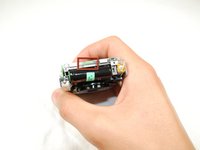
    • Be cautious of the flash capacitor. It carries an electrical charge, that may give you an unpleasant shock.

    Ask FixBot

    Add Comment

  5. Samsung L100 LCD Screen Replacement: step 5, image 1 of 1
    • Carefully pull off the back cover, parts behind the back of the case might fall out.

    Ask FixBot

    Add Comment

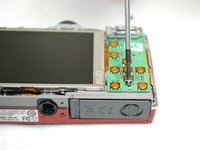
  6. Samsung L100 LCD Screen Replacement, LCD Screen: step 6, image 1 of 2 Samsung L100 LCD Screen Replacement, LCD Screen: step 6, image 2 of 2
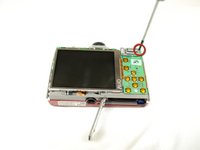
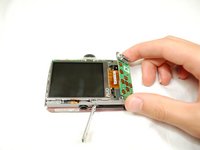
    • Remove the screws holding the circuit board.

    • Carefully remove the circuit board.

    Ask FixBot

    Add Comment

  7. Samsung L100 LCD Screen Replacement: step 7, image 1 of 2 Samsung L100 LCD Screen Replacement: step 7, image 2 of 2
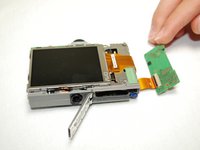
    • Carefully lift circuit board from camera.

    • Circuit board still attached to camera by ribbon.

    Ask FixBot

    Add Comment

  8. Samsung L100 LCD Screen Replacement: step 8, image 1 of 1
    • Remove the front cover. It should come off easily.

    • Buttons might fall out when you remove the front cover.

    Ask FixBot

    Add Comment

  9. Samsung L100 LCD Screen Replacement: step 9, image 1 of 2 Samsung L100 LCD Screen Replacement: step 9, image 2 of 2
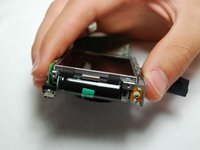
    • Remove the green tape that holds the LCD screen.

    • Carefully lift the LCD Screen.

    Ask FixBot

    Add Comment

  10. Samsung L100 LCD Screen Replacement: step 10, image 1 of 3 Samsung L100 LCD Screen Replacement: step 10, image 2 of 3 Samsung L100 LCD Screen Replacement: step 10, image 3 of 3
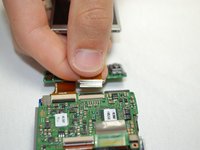
    • Flip the camera over to the other side.

    • Lift the black strip and the ribbon should easily come out.

    • The LCD Screen should be completely separated from the camera now.

    Ask FixBot

    Add Comment

  11. Samsung L100 LCD Screen Replacement: step 11, image 1 of 2 Samsung L100 LCD Screen Replacement: step 11, image 2 of 2
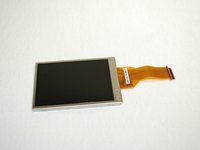
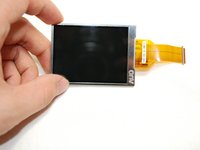
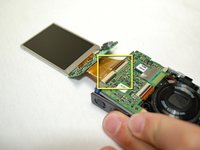
    • Insert the new LCD Screen by pushing the ribbon into the slot.

    • Flip the black strip back down to lock the ribbon in.

    • Your new LCD Screen should be connected to the camera now.

    Ask FixBot

    Add Comment

Conclusion

To reassemble your device, follow these instructions in reverse order.

Cancel: I did not complete this guide.

One other person completed this guide.

Hasit

Member since: 04/15/10

207 Reputation

2 Guides authored

Team

Cal Poly, Team 6-17, Maness Spring 2010 Member of Cal Poly, Team 6-17, Maness Spring 2010

CPSU-MANESS-S10S6G17

4 Members

10 Guides authored

0 Guide Comments

Add Comment

View Statistics:

Past 24 Hours: 2

Past 7 Days: 10

Past 30 Days: 57

All Time: 6,745