Free Shipping on Domestic Orders $75+

Samsung Instinct Camera Replacement

What you need

  1. Samsung Instinct Camera Replacement, Battery: step 1, image 1 of 1
    • Apply pressure to the back cover and slide it forward towards the camera.

    • Lift the back cover off the phone.

    Ask FixBot

    Add Comment

  2. Samsung Instinct Camera Replacement: step 2, image 1 of 1
    • Holding the phone firmly, use the notches to grip and lift up the battery.

    Ask FixBot

    Add Comment

  3. Samsung Instinct Camera Replacement, Back Case: step 3, image 1 of 1
    • Remove the four 4.45mm screws at the corners of the phone.

    Ask FixBot

    Add Comment

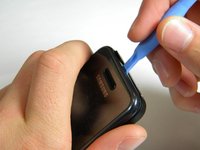
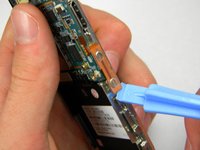
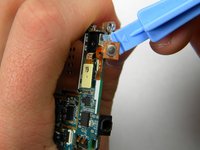
  4. Samsung Instinct Camera Replacement: step 4, image 1 of 2 Samsung Instinct Camera Replacement: step 4, image 2 of 2
    • Use the plastic opening tool to unhinge the locks around the edges of the phone.

    • Do not worry about the inner components of the phone; they are not connected to this case.

    Ask FixBot

    Add Comment

  5. Samsung Instinct Camera Replacement: step 5, image 1 of 1
    • Lift the casing off of the phone.

    Ask FixBot

    Add Comment

  6. Samsung Instinct Camera Replacement, Antenna: step 6, image 1 of 1
    • With the screws removed, locate the antenna.

    Ask FixBot

    Add Comment

  7. Samsung Instinct Camera Replacement: step 7, image 1 of 1
    • Using a Phillips head screwdriver, remove the 4.50mm screw holding the antenna in place.

    Ask FixBot

    Add Comment

  8. Samsung Instinct Camera Replacement: step 8, image 1 of 1
    • Using the plastic opener tool, squeeze gently on the antenna cable connector and lift to remove the connector from its position.

    Ask FixBot

    Add Comment

  9. Samsung Instinct Camera Replacement: step 9, image 1 of 1
    • Gently lift up on the antenna and remove it from the back of the device.

    Ask FixBot

    Add Comment

  10. Samsung Instinct Camera Replacement, Front Case: step 10, image 1 of 1
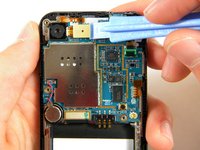
    • Remove the two 3.50mm screws connecting the motherboard to the case.

    Ask FixBot

    Add Comment

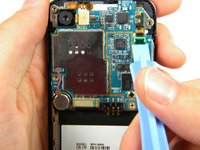
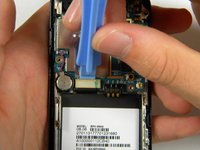
  11. Samsung Instinct Camera Replacement: step 11, image 1 of 3 Samsung Instinct Camera Replacement: step 11, image 2 of 3 Samsung Instinct Camera Replacement: step 11, image 3 of 3
    • Use the plastic opener tool to detach the three ribbons on the motherboard.

    Ask FixBot

    Add Comment

  12. Samsung Instinct Camera Replacement: step 12, image 1 of 1
    • Lift out the top right ribbon from its slot on the motherboard.

    Ask FixBot

    Add Comment

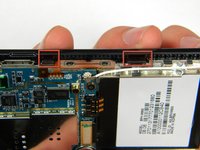
  13. Samsung Instinct Camera Replacement: step 13, image 1 of 2 Samsung Instinct Camera Replacement: step 13, image 2 of 2
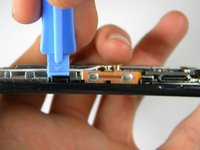
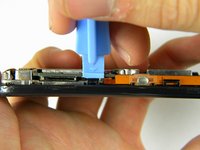
    • Use the plastic opener tool to unhinge the the locks on the side of the motherboard connecting it to the front casing.

    Ask FixBot

    Add Comment

  14. Samsung Instinct Camera Replacement: step 14, image 1 of 1
    • Lift the motherboard away from the front casing.

    Ask FixBot

    Add Comment

  15. Samsung Instinct Camera Replacement: step 15, image 1 of 1
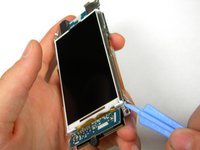
    • After removing lifting up on the motherboard, the front casing and center frame should be separated as shown.

    Ask FixBot

    Add Comment

  16. Samsung Instinct Camera Replacement, Motherboard: step 16, image 1 of 3 Samsung Instinct Camera Replacement, Motherboard: step 16, image 2 of 3 Samsung Instinct Camera Replacement, Motherboard: step 16, image 3 of 3
    • Using the plastic opener tool, gently pry away the side strip control buttons from the metal center frame.

    • There are three strips total: one on the right, left, and top of the phone.

    Ask FixBot

    Add Comment

  17. Samsung Instinct Camera Replacement: step 17, image 1 of 1
    • Using the plastic opener tool, pry the speaker connector away from the back of the motherboard.

    Ask FixBot

    Add Comment

  18. Samsung Instinct Camera Replacement: step 18, image 1 of 1
    • Using the plastic opener tool, remove the speaker from its setting.

    • Pry where the wire enters the speaker.

    • The speaker has adhesive on the bottom, thus removing it will require a bit of wiggling.

    Ask FixBot

    Add Comment

  19. Samsung Instinct Camera Replacement: step 19, image 1 of 1
    • Gently lift the motherboard from the center frame.

    Ask FixBot

    Add Comment

  20. Samsung Instinct Camera Replacement, Camera: step 20, image 1 of 1
    • Once the motherboard is removed from the frame, use the pry tool to remove the camera.

    • Insert the pry bar between the camera and the frame then lift up.

    • The camera is held in by adhesive so it will require some force to remove.

    • You have now successfully removed the camera from your Samsung Instinct.

    Ask FixBot

    Add Comment

Conclusion

To reassemble your device, follow these instructions in reverse order.

Cancel: I did not complete this guide.

2 other people completed this guide.

Patrick

Member since: 10/11/11

75 Reputation

2 Guides authored

Team

Cal Poly, Team 3-13, Regan Fall 2011 Member of Cal Poly, Team 3-13, Regan Fall 2011

CPSU-REGAN-F11S3G13

4 Members

24 Guides authored

0 Guide Comments

Add Comment

View Statistics:

Past 24 Hours: 0

Past 7 Days: 4

Past 30 Days: 30

All Time: 1,211