Up to 20% off select tools
Free Shipping on Domestic Orders $75+

Samsung Instinct Antenna Replacement

Views: 1.4K

View statistics:

Past 24 Hours:
0
Past 7 Days:
0
Past 30 Days:
15
All Time:
1,439
Comments: 0

No one has left comments on this guide. Will you be first?

Go to guide comments
Completed: 0

No one has marked this guide "completed." Will you be the first?

Favorites: 0

No one has favorited (and subscribed to) this guide. Will you be the first?

Time Required: 5 minutes
Difficulty: Moderate
Samsung Instinct Antenna Replacement

What you need

Tools

Introduction

Go to step 1 ↓

This guide shows how to take out the antenna so that a replacement can be installed.

    1. Samsung Instinct Antenna Replacement, Battery: step 1, image 1 of 1
      • Apply pressure to the back cover and slide it forward towards the camera.

      • Lift the back cover off the phone.

      Ask FixBot

      Add Comment

    2. Samsung Instinct Antenna Replacement: step 2, image 1 of 1
      • Holding the phone firmly, use the notches to grip and lift up the battery.

      Ask FixBot

      Add Comment

    1. Samsung Instinct Antenna Replacement, Back Case: step 3, image 1 of 1
      • Remove the four 4.45mm screws at the corners of the phone.

      Ask FixBot

      Add Comment

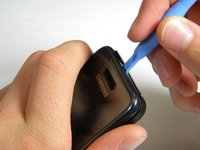
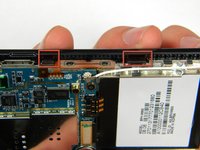
    2. Samsung Instinct Antenna Replacement: step 4, image 1 of 2 Samsung Instinct Antenna Replacement: step 4, image 2 of 2
      • Use the plastic opening tool to unhinge the locks around the edges of the phone.

      • Do not worry about the inner components of the phone; they are not connected to this case.

      Ask FixBot

      Add Comment

    3. Samsung Instinct Antenna Replacement: step 5, image 1 of 1
      • Lift the casing off of the phone.

      Ask FixBot

      Add Comment

    1. Samsung Instinct Antenna Replacement, Antenna: step 6, image 1 of 1
      • With the screws removed, locate the antenna.

      Ask FixBot

      Add Comment

    2. Samsung Instinct Antenna Replacement: step 7, image 1 of 1
      • Using a Phillips head screwdriver, remove the 4.50mm screw holding the antenna in place.

      Ask FixBot

      Add Comment

    3. Samsung Instinct Antenna Replacement: step 8, image 1 of 1
      • Using the plastic opener tool, squeeze gently on the antenna cable connector and lift to remove the connector from its position.

      Ask FixBot

      Add Comment

    4. Samsung Instinct Antenna Replacement: step 9, image 1 of 1
      • Gently lift up on the antenna and remove it from the back of the device.

      Ask FixBot

      Add Comment

Conclusion

To reassemble your device, follow these instructions in reverse order.

Cancel: I did not complete this guide.

Author

with

Jimmy Kuo

Member since: 10/10/11

14 Reputation

2 Guides authored

Team

Cal Poly, Team 3-13, Regan Fall 2011 Member of Cal Poly, Team 3-13, Regan Fall 2011

CPSU-REGAN-F11S3G13

4 Members

96 Guides authored

0 Guide Comments

Add Comment

View Statistics:

Past 24 Hours: 0

Past 7 Days: 0

Past 30 Days: 15

All Time: 1,439