
Samsung HMX-F90 LCD Screen Replacement

Amir Harb and 2 other contributors
Last updated on May 7, 2024
Views: 2K
View statistics:
- Past 24 Hours:
- 1
- Past 7 Days:
- 16
- Past 30 Days:
- 89
- All Time:
- 1,991
Comments: 1
1 guide comment.
Go to guide commentsCompleted: 0 1
No one has marked this guide "completed." Will you be the first?
1 person has marked this guide "completed." It's you — great job!
Favorites: 0 1
No one has favorited (and subscribed to) this guide. Will you be the first?
1 person has favorited (and subscribed to) this guide — and that's you!
Introduction
Go to step 1 ↓Cracked or faulty LCD screens can make the HMX-F90 difficult to use. This guide can be used to replace the flip-out LCD screen.
What you need
Tools


-
-
-
Rotate the camcorder so that back is facing you. Then flip open the LCD screen.
-
Locate and remove the 4.5mm Phillips #00 screws in the LCD screen base.
 Ask FixBot
-
-
-
Rotate the camcorder so that it is facing you.
-
Locate and remove the two 4.5mm Phillips #00 screws.
-
-
-
Open the LCD screen and rotate it around 90 degrees.
-
Locate the small prying notch and use a prying tool to slowly remove the LCD cover.
-
-
-
Tool used on this step:Tweezers$4.99
-
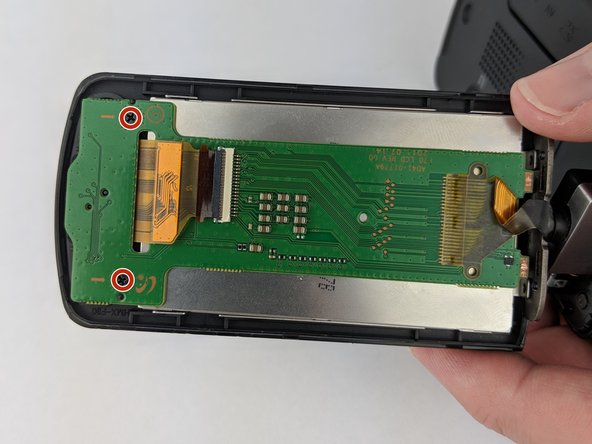
With tweezers gently unclip the silver tab holding the ribbon wire.
-
Gradually feed the ribbon wire through the hole to remove the screen.
-
-




To reassemble your device, follow these instructions in reverse order.

Team

USF Tampa, Team S13-G1, Boczar Fall 2017 Member of USF Tampa, Team S13-G1, Boczar Fall 2017
USFT-BOCZAR-F17S13G1
4 Members
72 Guides authored
