Free Shipping on Domestic Orders $75+

Samsung Gear S2 Motherboard Replacement

What you need

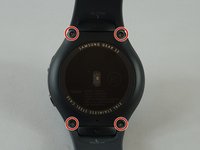
  1. Samsung Gear S2 Motherboard Replacement, Watch Strap: step 1, image 1 of 2 Samsung Gear S2 Motherboard Replacement, Watch Strap: step 1, image 2 of 2
    • Flip the watch over so that the face is down.

    • Using a Y#0 screwdriver, unscrew the four 3.5 millimeter tri-head screws.

    • Remember to turn off the watch to avoid being shocked.

    Ask FixBot

    Add Comment

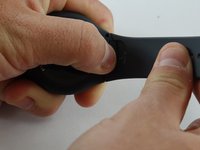
  2. Samsung Gear S2 Motherboard Replacement: step 2, image 1 of 2 Samsung Gear S2 Motherboard Replacement: step 2, image 2 of 2
    • Using your finger, push forward on the release while pulling up on the strap.

    • You may find it helpful to use the flat end of a spudger to push on the release instead of your finger.

    Ask FixBot

    Add Comment

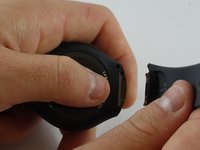
  3. Samsung Gear S2 Motherboard Replacement: step 3, image 1 of 2 Samsung Gear S2 Motherboard Replacement: step 3, image 2 of 2
    • Repeat the procedure from step 2 for the other strap.

    Ask FixBot

    Add Comment

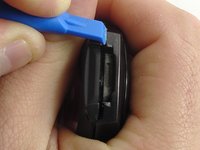
  4. Samsung Gear S2 Motherboard Replacement, Back: step 4, image 1 of 2 Samsung Gear S2 Motherboard Replacement, Back: step 4, image 2 of 2
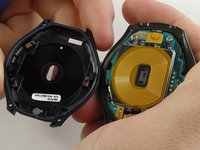
    • Insert a plastic opening tool between the top and bottom portions of the case, and gently pry off the back.

    • Do not insert the tool more than 3 millimeters into the case. Inserting more than 3 mm may damage the seal and electric components.

    Ask FixBot

    Add Comment

  5. Samsung Gear S2 Motherboard Replacement, Motherboard: step 5, image 1 of 2 Samsung Gear S2 Motherboard Replacement, Motherboard: step 5, image 2 of 2
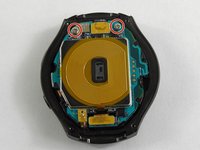
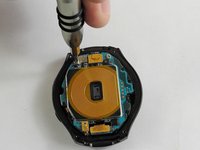
    • Using a Philips head #00 screwdriver, remove the two 3.6 millimeter screws.

    Ask FixBot

    Add Comment

  6. Samsung Gear S2 Motherboard Replacement: step 6, image 1 of 3 Samsung Gear S2 Motherboard Replacement: step 6, image 2 of 3 Samsung Gear S2 Motherboard Replacement: step 6, image 3 of 3
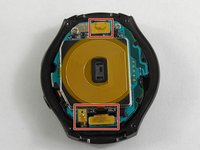
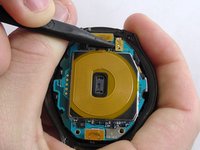
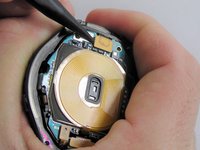
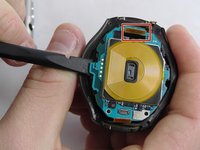
    • Using a spudger, pry up the three cables.

    Ask FixBot

    Add Comment

  7. Samsung Gear S2 Motherboard Replacement: step 7, image 1 of 2 Samsung Gear S2 Motherboard Replacement: step 7, image 2 of 2
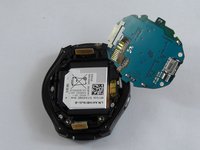
    • Using the flat end of a spudger, pry up the motherboard.

    • Make sure the cable is fed through the hole to avoid damaging it.

    • The motherboard is attached to the battery casing, so place the motherboard in the orientation shown once freed.

    Ask FixBot

    Add Comment

Conclusion

To reassemble your device, follow these instructions in reverse order.

Cancel: I did not complete this guide.

7 other people completed this guide.

Jacob Baldwin

Member since: 02/20/17

3,459 Reputation

5 Guides authored

Team

USF Tampa, Team S2-G3, Sullivan Spring 2017 Member of USF Tampa, Team S2-G3, Sullivan Spring 2017

USFT-SULLIVAN-S17S2G3

3 Members

23 Guides authored

6 Guide Comments

Where do you get the mother board.

Walter Meekins - Reply Share

I'm looking for a new motherboard as well.

Karen - Reply Share

Where do you buy a motherboard???

kiki3w - Reply Share

Do you have a good source for motherboards? Hope it helps that I +30’d you!

darkfeather72 - Reply Share

Ok motherboard replaced but how can I have the watch to work in normal mode and not in factory release.?

Cyan - Reply Share

Add Comment

View Statistics:

Past 24 Hours: 3

Past 7 Days: 13

Past 30 Days: 47

All Time: 17,697