Free Shipping on Domestic Orders $75+

Samsung Gear S2 Battery Replacement

Views: 163K

View statistics:

Past 24 Hours:
7
Past 7 Days:
36
Past 30 Days:
241
All Time:
162,803
Comments: 55

16 comments on steps, 39 guide comments.

Go to guide comments
Completed: 103

103 people have marked this guide "completed." Will you be next?

Favorites: 14

14 people have favorited (and subscribed to) this guide. Will you be next?

Time Required: 15 - 20 minutes
Difficulty: Moderate
Samsung Gear S2 Battery Replacement

Introduction

Go to step 1 ↓

Does your watch battery last less than a day with minimal use, or does the watch only power on when connected to the charger? Replacing the battery may fix these problems.

What you need

Parts

Tools

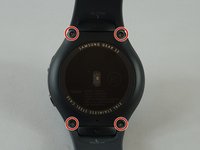
    1. Samsung Gear S2 Battery Replacement, Watch Strap: step 1, image 1 of 2 Samsung Gear S2 Battery Replacement, Watch Strap: step 1, image 2 of 2
      • Flip the watch over so that the face is down.

      • Using a Y#0 screwdriver, unscrew the four 3.5 millimeter tri-head screws.

      • Remember to turn off the watch to avoid being shocked.

      Ask FixBot

      Add Comment

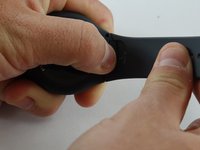
    2. Samsung Gear S2 Battery Replacement: step 2, image 1 of 2 Samsung Gear S2 Battery Replacement: step 2, image 2 of 2
      • Using your finger, push forward on the release while pulling up on the strap.

      • You may find it helpful to use the flat end of a spudger to push on the release instead of your finger.

      Ask FixBot

      Add Comment

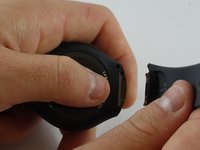
    3. Samsung Gear S2 Battery Replacement: step 3, image 1 of 2 Samsung Gear S2 Battery Replacement: step 3, image 2 of 2
      • Repeat the procedure from step 2 for the other strap.

      Ask FixBot

      Add Comment

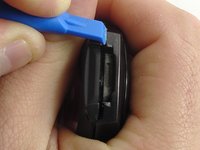
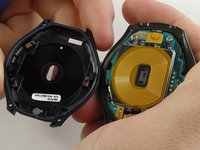
    1. Samsung Gear S2 Battery Replacement, Back: step 4, image 1 of 2 Samsung Gear S2 Battery Replacement, Back: step 4, image 2 of 2
      • Insert a plastic opening tool between the top and bottom portions of the case, and gently pry off the back.

      • Do not insert the tool more than 3 millimeters into the case. Inserting more than 3 mm may damage the seal and electric components.

      Ask FixBot

      Add Comment

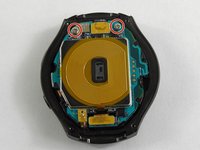
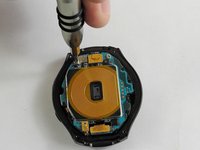
    1. Samsung Gear S2 Battery Replacement, Motherboard: step 5, image 1 of 2 Samsung Gear S2 Battery Replacement, Motherboard: step 5, image 2 of 2
      • Using a Philips head #00 screwdriver, remove the two 3.6 millimeter screws.

      Ask FixBot

      Add Comment

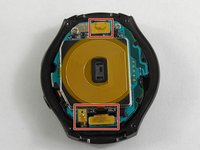
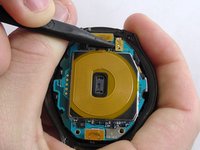
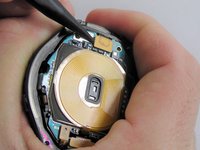
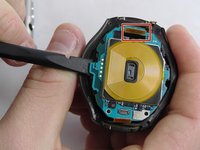
    2. Samsung Gear S2 Battery Replacement: step 6, image 1 of 3 Samsung Gear S2 Battery Replacement: step 6, image 2 of 3 Samsung Gear S2 Battery Replacement: step 6, image 3 of 3
      • Using a spudger, pry up the three cables.

      Ask FixBot

      Add Comment

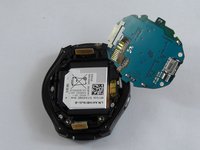
    3. Samsung Gear S2 Battery Replacement: step 7, image 1 of 2 Samsung Gear S2 Battery Replacement: step 7, image 2 of 2
      • Using the flat end of a spudger, pry up the motherboard.

      • Make sure the cable is fed through the hole to avoid damaging it.

      • The motherboard is attached to the battery casing, so place the motherboard in the orientation shown once freed.

      Ask FixBot

      Add Comment

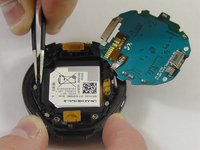
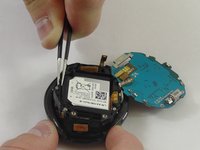
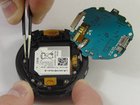
    1. Samsung Gear S2 Battery Replacement, Battery: step 8, image 1 of 2 Samsung Gear S2 Battery Replacement, Battery: step 8, image 2 of 2
      Tool used on this step:
      Tweezers
      $4.99
      Buy
      • Using tweezers, lift the battery casing.

      • Make sure the cables are fed through their gaps to avoid damaging them.

      Ask FixBot

      Add Comment

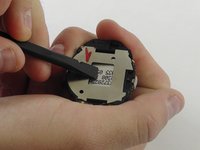
    2. Samsung Gear S2 Battery Replacement: step 9, image 1 of 2 Samsung Gear S2 Battery Replacement: step 9, image 2 of 2
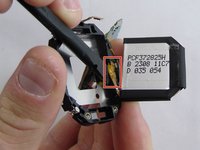
      • Flip the battery casing over and using a spudger, push on the battery to free it from the casing.

      • Once the battery is free, use the flat end of a spudger to lift up the battery cable.

      Ask FixBot

      Add Comment

Conclusion

To reassemble your device, follow these instructions in reverse order.

Cancel: I did not complete this guide.

103 other people completed this guide.

Jacob Baldwin

Member since: 02/20/17

3,459 Reputation

5 Guides authored

Team

USF Tampa, Team S2-G3, Sullivan Spring 2017 Member of USF Tampa, Team S2-G3, Sullivan Spring 2017

USFT-SULLIVAN-S17S2G3

3 Members

60 Guides authored

39 Guide Comments

Excellent guidelines, and do you have steps for s3 frontier

pedro tiburcio - Reply Share
A reference to the battery part number would be great.

Harold Turner - Reply Share

Very good job and very easy

JEAN PIERRE - Reply Share

I have the Gear S2 3G version R730V and purchased a battery thinking these instructions would work, but once I opened the watch it is not the same as the one above. Does anyone have instructions on how to replace the batter on the R730V??

Irene - Reply Share

Add Comment

View Statistics:

Past 24 Hours: 7

Past 7 Days: 36

Past 30 Days: 241

All Time: 162,803